TL;DR

Turn the school run and nap time into listening time
- Thousands of audiobooks, podcasts and originals
- Listen on your phone, tablet or Echo — also offline
- Cancel anytime
Reusing a sock monitor for a second baby can save money, but it demands careful inspection, updating, and testing. Confirm device support, replace worn parts, and verify setup before trusting it overnight.
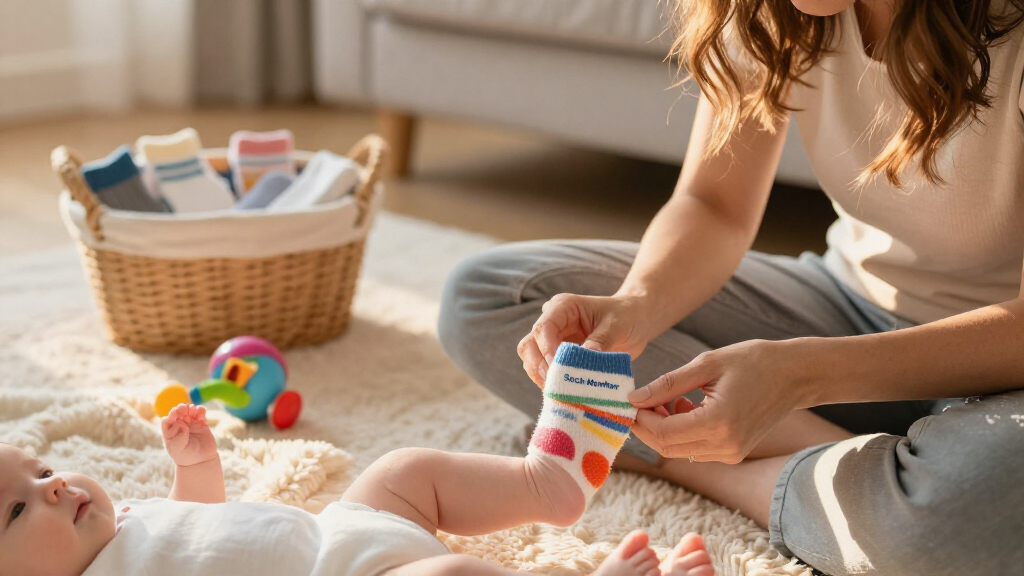
When your first baby outgrows that adorable sock monitor, it’s tempting to pass it on to the next. But these devices aren’t just simple hand-me-downs—they’re electronic safety tools with delicate sensors and software that can age or become unsupported.
Knowing how to evaluate and prepare a sock monitor for reuse can make the difference between a helpful safety aid and a false sense of security. This guide walks you through the essential steps to reuse smart baby socks responsibly, keeping your second little one safe and connected.
Always verify the support status and firmware updates before reusing a sock monitor.
Inspect the hardware thoroughly—look for cracks, corrosion, or worn fabric—replace worn parts for safety and fit.
Test the entire alert system during the day, including connectivity, audio, and notification reliability.
Use new fabric socks and replace batteries if performance drops or signs of wear appear.
Remember, a monitor is an aid—not a substitute for safe sleep practices and vigilant supervision.
Sock Monitor for the Second Baby: A Reuse Checklist
A hand-me-down sock monitor can save real money—but it is a safety-sensitive electronic device, not just another baby item. Verify support, replace worn parts, and test the full alert chain before you trust it overnight.
From Drawer to Crib in Six Checks
Follow the chain in order — each step gates the next. Skipping ahead risks a false sense of security during your second baby’s most vulnerable hours.
Identify
Brand, model, generation, serial number, purchase date & region of sale.
Verify Support
Recalls, discontinued models, app availability, current OS compatibility.
Inspect Hardware
Cracks, corrosion, swelling, loose connectors, exposed wiring, heat.
Replace & Clean
New fabric socks, battery check, approved disinfectants only.
Reset & Update
Factory reset, new firmware, fresh profile & caregiver accounts.
Daylight Test
Full alert-chain test before the first overnight reliance.
The Component Decision Table
Not every part ages the same way. Fabric, elastic, adhesives and batteries deteriorate far faster than the sensor or base station. Here is what to keep, swap, or scrap.
| Component | Verdict | What to Check | Red Flags |
|---|---|---|---|
| Fabric sock / strap | ✗ Replace | Elasticity, frayed edges, stains, fasteners, correct size for baby #2 | Stretched-out fit, stains, missing fasteners, DIY tape fixes |
| Battery | ~ Evaluate | Charges normally, full capacity, stable connection, low-battery alert works | Swelling, leaks, heat, runtime collapse (e.g. 8h → 3h) |
| Sensor unit | ✓ Keep (if intact) | Sits securely in position, no cracks or scorch marks | Loose connectors, exposed wiring, unreadable labels |
| Base station & cable | ~ Evaluate | Corrosion-free contacts, manufacturer-approved charger | Corroded charging port, damaged or third-party cables |
| Software & account | ✗ Reset | Removable from previous account, current firmware, active servers | Expired subscription, app pulled from store, dead OS support |
What Deteriorates First
Relative likelihood of age- and use-related degradation in a secondhand sock monitor. Wearable parts and batteries dominate the risk profile — the electronics usually outlast them.
Four Areas You Cannot Skip
These checks separate a helpful safety aid from a false sense of security. Complete all of them well before the baby arrives.
Confirm the Device Is Still Supported
- Check manufacturer notices and national product-safety regulators
- Verify the app is available in your region and on your current phone
- Confirm the unit can be unlinked from the previous owner’s account
- No support = no bug fixes — treat it as end-of-life
Hygiene, Sizing & Skin Safety
- Remove electronics before washing any fabric parts
- Mild soap, diluted alcohol or baby-safe wipes — never bleach or heat
- Snug fit only: no redness, blisters, pressure marks or moisture buildup
- Dry completely before reassembly and testing
Test the Whole Chain in Daylight
- Trigger test alerts and confirm audio reaches your bedroom
- Verify notifications arrive on every caregiver’s phone
- Check Wi-Fi stability at the crib’s actual location
- Confirm the low-battery warning fires reliably
Fresh Start for Baby #2
- Factory reset per manufacturer instructions
- Update firmware and app, then reconfigure Wi-Fi & alerts
- Delete the old child profile and old emergency contacts
- Prevents stale settings from triggering false alarms
Key insight: A secondhand sock monitor remains most reliable when it is supported by current firmware, free from recalls, and physically intact. Home cardiorespiratory monitors have not been shown to prevent SIDS — a reassuring app reading can never rule out illness. Respond to your baby’s appearance and symptoms, not just the screen.
How to Confirm Your Sock Monitor Still Supports Your New Baby
The first step is ensuring your device is still supported—by the manufacturer, the app, and your current phone. Look up the exact model, serial number, and generation. Different versions can have varying capabilities, accessories, and regulatory status.
For example, a sock monitor from two years ago might not work with the latest iOS or Android updates. Check the manufacturer’s website for notices or updates. If support has ended, consider replacing the device or consulting a pediatrician about alternative monitoring options.
Remember, no support means no app updates or bug fixes—these are critical for safety and reliability.
baby sock monitor replacement parts
As an affiliate, we earn on qualifying purchases.
As an affiliate, we earn on qualifying purchases.
Inspecting the Hardware — What to Look For Before Reusing
Physical condition matters. Examine every component closely—look for cracks, scorch marks, swelling, or corrosion. A worn or damaged sock could slip off or malfunction during a crucial moment.
Check the sensor and base station for loose connectors or exposed wiring. Test the charging cable and port for damage or corrosion. If you see any of these signs, don’t reuse—replace worn parts or buy new accessories.
For example, a frayed sock that’s lost elasticity can’t hold the sensor securely, risking inaccurate readings or discomfort.
Understanding the importance of hardware integrity helps prevent failures during critical moments. A compromised device might give false reassurance or, worse, fail to alert when it’s most needed. Investing time in thorough inspection ensures safety and peace of mind, avoiding the tradeoff between saving money and risking your baby’s safety.
baby sock monitor firmware update kit
As an affiliate, we earn on qualifying purchases.
As an affiliate, we earn on qualifying purchases.
Battery Health—Is It Time for a New One?
Battery performance degrades over time—even if the device has been stored. Test whether the monitor charges normally, reaches full capacity, and runs for the expected period. If it can’t hold a charge or heats up excessively, it’s time for a new battery or a replacement device.
For instance, a monitor that used to run reliably for 8 hours might now only last 3, which isn’t enough for an overnight. Always use manufacturer-approved replacement parts to avoid safety issues.
Remember, a weak battery can cause false alarms or sudden shutdowns—both dangerous in a monitoring device.
Fading battery capacity doesn’t just reduce runtime; it can also lead to inconsistent alerts. A dying battery might cause the device to turn off unexpectedly, leaving your baby unmonitored when you need it most. Conversely, overcharging or using incompatible batteries could pose safety risks, like overheating or leaks. Ensuring the battery is in good health is a foundational step to guarantee reliable, safe operation, and peace of mind during your baby’s vulnerable hours.
As an affiliate, we earn on qualifying purchases.
Replacing Wearable Parts — When and Why
Fabric socks, straps, and fasteners are the most likely to wear out or become contaminated. Replacing these is often the best way to ensure a proper fit and hygiene. Look for frayed edges, stains, or loss of elasticity.
For example, a sock that’s stretched out or stained from your first baby’s spit-up isn’t just unhygienic—it might not stay securely in place, risking inaccurate readings.
Buy new, compatible fabric socks or sensor holders designed for your model, avoiding DIY fixes like tape, which can cause discomfort or safety issues.
Regular replacement of worn parts isn’t just about hygiene—it directly impacts the device’s ability to function correctly. Worn or contaminated materials can lead to poor sensor contact, resulting in false alarms or missed signals. Properly fitted, clean, and intact wearable parts ensure consistent monitoring, which is critical for detecting early signs of distress and preventing false reassurance or unnecessary worry.
As an affiliate, we earn on qualifying purchases.
Cleaning and Disinfecting — How to Do It Right
Cleaning is more than just wiping down. Remove electronic components before washing or disinfecting fabric parts. Use approved disinfectants that won’t damage sensors or coatings—mild soap, diluted alcohol, or specific baby-safe wipes work well.
For example, wipe sensors with a soft cloth dipped in a gentle disinfectant, and avoid soaking or submerging electronic parts. Let everything dry completely before reassembling and testing.
Never use bleach or heat, which can ruin delicate surfaces and coatings.
Proper cleaning and disinfecting are essential for preventing the buildup of germs and allergens that can cause skin irritation or infections. Inadequate cleaning can leave behind bacteria or mold, which pose health risks, especially to infants with sensitive skin or compromised immune systems. Using the right disinfectants and techniques preserves the device’s integrity while ensuring safety. Regular cleaning reduces the risk of infection and prolongs device lifespan, making it a vital step in safe reuse.
Ensuring a Good Fit and Skin Safety for Your Baby
Correct sizing and placement are non-negotiable. The sock should snugly fit your baby’s foot—no tightness, redness, or blisters. Check regularly for signs of pressure, discoloration, or moisture buildup.
For example, a sock that’s too tight can cause redness or blisters after just an hour. A loose sock might slip and lose contact, causing false alarms or missed signals.
Adjust the fit as your baby grows, and never tighten the sock beyond manufacturer recommendations.
Ensuring a proper fit isn’t just about comfort—it directly impacts the device’s ability to accurately monitor vital signs. An ill-fitting sock can cause false alarms or missed alerts, which may lead to unnecessary worry or missed signs of distress. Proper fit ensures reliable data collection and helps you respond promptly to your baby’s needs, maintaining both safety and comfort. Regularly checking fit and skin condition is a simple yet crucial step to prevent discomfort and ensure continuous, accurate monitoring.
Resetting and Updating the System — Fresh Start for Safety
Before using the device again, perform a factory reset through the manufacturer’s instructions. Update firmware and app versions—these patches often fix bugs and improve reliability.
Remove the old baby’s profile and add your current caregiver accounts. Reconfigure Wi-Fi settings, alert preferences, and emergency contacts. This ensures no residual data or settings from the previous child interfere.
For example, a reset clears old notifications and links, preventing mix-ups or false alarms during your second baby’s first nights.
Performing these steps ensures that the device’s software environment is fresh, reducing the risk of glitches or outdated settings affecting performance. It also protects your privacy by removing previous data, and ensures that the configuration matches your current household and baby’s needs, avoiding confusion or errors that could compromise safety.
Testing the System — How to Confirm It Works Properly
Test during daylight, with your supervision. Use the manufacturer’s test mode if available, or simulate baby’s sleep. Confirm the sensor connects reliably, the base alerts audibly, and notifications arrive on your phone.
Check that alerts trigger when the system is disconnected or Wi-Fi is turned off. Make sure caregivers can recognize alarms easily. Repeat the test a few times, including after power loss or Wi-Fi interruption.
For example, if the alarm sounds only on your phone but not on the base station, you need to troubleshoot that connection before trusting it overnight.
Thorough testing helps identify weak points—such as connectivity issues, audio failures, or delayed notifications—that could lead to missed alarms during critical moments. Addressing these issues proactively ensures that the system functions reliably under various conditions, giving you confidence in its performance and safeguarding your baby’s well-being.
Relearning Instructions — Don’t Assume It’s the Same Setup
Every baby is different, and so is every device. Review the user manual again. Confirm age limits, placement, charging routines, and alert meanings. Follow the manufacturer’s guidance for your new baby’s size and health needs.
For example, a monitor designed for 6 months and up might not be suitable for a preemie or a medically fragile infant. Adjust your expectations and setup accordingly.
Keep the monitor out of the sleep area unless explicitly instructed, to avoid safety hazards.
Relearning the device’s setup isn’t just about following instructions—it’s about understanding how your new baby’s unique needs might require adjustments. This process helps prevent misinterpretation of signals or misuse, which could lead to safety risks. Familiarity with the current setup and guidelines ensures you’re using the device effectively and safely, tailored to your baby’s current development and health status.
Safe Sleep Still Comes First—Monitor Isn’t a Substitute
Remember, a sock monitor is an aid—NOT a replacement for good sleep practices. Always place your baby on their back on a firm, flat surface. Keep loose bedding, pillows, and toys out of the sleep area.
Never rely solely on alarms to keep your baby safe. The monitor should supplement, not replace, vigilant supervision and safe sleep routines.
For example, if your baby turns red or shows signs of distress, respond immediately—don’t wait for an alarm. Safety comes first.
While technology can enhance safety, it is not infallible. Relying solely on alarms might lead to complacency or delayed responses. Maintaining vigilant supervision and adhering to safe sleep guidelines are essential to truly protect your infant, regardless of device support.
Recent Developments in Baby Sock Monitors You Should Know
Regulators are paying closer attention. Many brands are redesigning to meet stricter safety standards and are seeking medical-device clearance for certain features. Always verify your model’s support status.
Support for older hardware is waning due to app discontinuation, OS updates, and server shutdowns. Software ecosystems are crucial for device support—physical sensors alone aren’t enough.
Alarm fatigue is a real concern. Frequent false alarms can cause caregivers to ignore warnings. Proper fit, realistic expectations, and a clear response plan are essential.
Privacy is also a rising concern. Check how your data is stored, shared, and deleted. Be aware of what’s collected and who has access.
Keeping up with these developments helps you make informed choices about your baby’s safety devices, ensuring they remain effective and compliant with current standards. It also highlights the importance of balancing technological features with practical safety considerations and privacy concerns.
When It’s Time to Say Goodbye to the Monitor
If your device is recalled, unsupported, or physically damaged beyond repair, replacing it is safer. Swollen batteries, persistent dropout issues, or inability to remove the device from accounts are signs it should go.
Medical conditions or changes in your baby’s health also matter. Always consult a healthcare professional if you’re unsure whether a consumer device fits your child’s needs.
Remember, no monitor replaces attentive care. If your anxiety or alarm fatigue becomes overwhelming, it’s better to trust your instincts and routine over an unreliable device.
Understanding when to retire a monitor ensures you’re not relying on compromised technology that might give false reassurance or fail when it’s most needed. Prioritizing safety over cost or convenience is essential to maintaining a secure environment for your baby.
Conclusion
Reusing a sock monitor for your second baby can save money and reduce waste—if you do it right. Think of it as a delicate electronic tool: it needs careful inspection, updates, and testing, just like any medical device.
Trust your judgment, prioritize safety, and don’t let the convenience overshadow the fundamentals of safe sleep. A monitor is a helpful companion, but your attentive care remains the best safeguard for your little ones.
Fall Picks
fall essentials
As an affiliate, we earn on qualifying purchases.