
TL;DR

Turn the school run and nap time into listening time
- Thousands of audiobooks, podcasts and originals
- Listen on your phone, tablet or Echo — also offline
- Cancel anytime
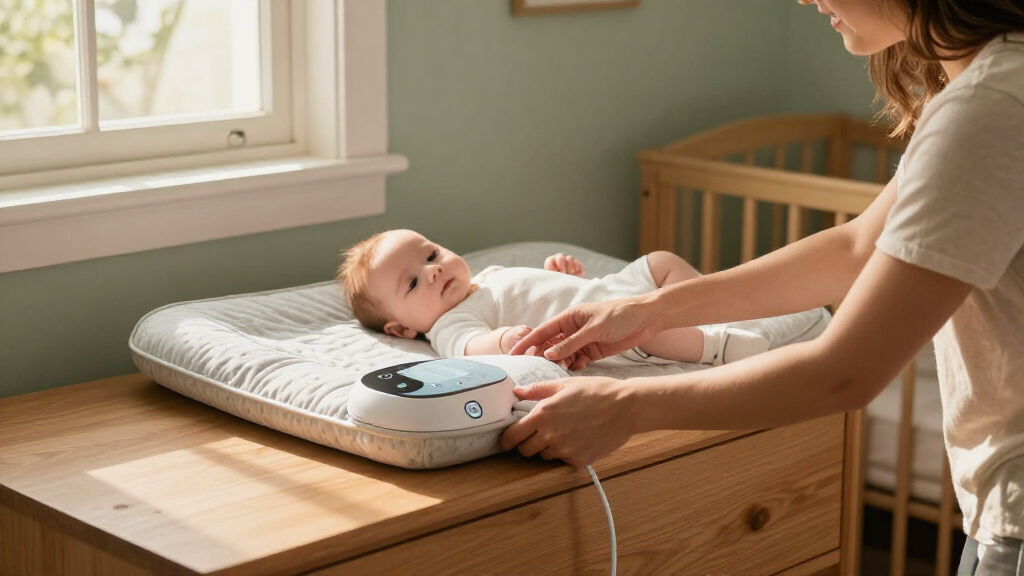
Put your smart changing pad on a firm, level surface approved by its manufacturer, keep your baby within reach, and keep cords away. Follow the device’s instructions to power and zero it, then weigh under similar conditions each time; treat readings as household tracking, not a diagnosis or substitute for pediatric advice.
At 3 a.m., a wobbly changing surface or a dead battery can turn a quick diaper change into a frustrating little project. A smart changing pad adds sensors and, in some models, an app or display to a familiar wipe-clean surface, but it still needs a steady home and a simple routine to be useful.
This guide walks you through placement, power, and calibration, including what to check before your baby is on the pad. You’ll also learn why readings can shift from one weigh-in to the next, what app charts can and cannot tell you, and when to ask your baby’s healthcare professional for help.
Think of the device as a convenient household recordkeeper. Its numbers can help you notice a pattern, but they don’t replace a clinician’s assessment or a medical scale when precise weight matters.
Place the pad on a firm, level surface approved by the manufacturer, with no sliding, rocking, or overhang.
Keep your baby within reach on a raised surface, and keep cords and charging gear out of reach.
Follow the model-specific instructions for batteries, charging, connectivity, and empty-pad zeroing.
Use similar weighing conditions and note whether clothing or a diaper was included.
Treat app readings as household tracking; ask your baby’s healthcare professional about growth, feeding, or weight concerns.
A practical setup guide · Baby care
Smart Changing Pad Setup
Placement, power and calibration shape how useful a smart changing pad can be. Start with a stable, approved surface; keep your baby within reach; then follow the device instructions for power and zeroing. Treat its readings as a household record, not a diagnosis.
Build a safer, steadier setup
Smart features may save measurements or show trends, but their availability and setup vary by model. Start with the product manual and the changing space.
Choose a firm, level base
Use a surface approved by the manufacturer. Check for rocking, sliding, tipping and overhang. Avoid soft or sagging bases unless the instructions specifically allow them.
Keep baby within reach
Center the pad as directed, keep supplies close, and maintain a hand on your baby on a raised surface. Never step away, even for a brief reach.
Keep cords and hazards away
Move charging gear out of reach. Set up away from edges, heaters, direct sun and splashes. Keep the changing area clear and ready before you begin.
After relocating the pad
Check that the new surface is level, stable and large enough. Then consult the manual about re-zeroing or recalibration before relying on another reading.
Plan for the midnight moment
Battery, charging and syncing behavior differ across products. Verify the exact requirements for your device rather than assuming one setup fits every pad.
Use the specified power source
Check the manual for battery type, adapter, charging method and whether use while charging is allowed.
Keep cables out of the changing area
Charge during a convenient daytime routine and keep loose cords and accessories beyond your baby’s reach.
Check power before blaming the sensor
If the display flickers or readings seem inconsistent, inspect battery level and connections before repeating a measurement.
Zero first. Measure consistently.
Calibration is device-specific. Many models ask you to settle the empty pad on its intended surface, then select zero or tare; others use an app-guided routine.
Run a quick setup check
Check the basics before relying on another measurement. Repeating attempts can add stress and still cannot establish medical accuracy.
Surface + position
Confirm the pad is level, settled, stable and on the intended base. Check for movement or an overhanging edge.
Zero + power
Make sure the pad is empty and dry, follow its tare routine, then inspect battery level and connections.
Conditions + connection
Review movement, clothing or diaper, and whether the app is connected. Follow the manual if you try again.
A smart changing pad can help keep a household record and highlight a pattern. Its estimate is not a diagnosis or a substitute for a medical scale when precise weight matters. Do not make feeding decisions from a single app reading. Contact your baby’s healthcare professional with concerns about growth, intake or weight gain.
Choose a firm spot where you can keep one hand on your baby
A smart changing pad belongs on a firm, level surface that the manufacturer allows, with enough room to keep your baby centered and within reach. The pad should not rock, slide, tip, or hang over an edge; a stable base supports both safer changes and more consistent readings.
Before setting it down, check the manual to see whether your model can sit on a dresser, changing table, or another surface. A folded towel may feel like a soft fix for a slightly uneven top, but it can shift under the pad and affect the sensor. Unless the instructions specifically permit it, avoid cushions, blankets, and sagging surfaces.
Keep the setup away from the edge, heaters, direct sun, and splashes from a nearby sink. Put wipes and a clean diaper close enough to reach without turning away. If you’re changing your baby on a raised table, keep a hand on them; even a quick reach for a forgotten diaper can be enough time for a roll.
For example, if you move the pad from a bedroom dresser to a changing table, check that the new surface is level and large enough before using it. Relocation can also change readings, so consult the manual about re-zeroing or recalibration. The safest setup is the one you can use without reaching across your baby or stepping away.
Popular right now

Samsung 75-Inch M80H Series Mini LED 4K Smart TV (2026)

Hisense 85 U7 Mini-LED ULED 4K UHD Smart Google TV (85U7SG, 2026)

Ninja Foodi Smart Dual Heat Air Fry Oven, 13-in-1, Silver (SP351)
As an affiliate, we earn on qualifying purchases.
Set up the power before the first midnight change
A smart changing pad may use batteries, USB charging, or an adapter; the right choice and charging rules depend on the model. Read the product manual for its specified power source, battery type, and whether you can use the pad while it charges. Power affects more than whether the display turns on: an interrupted or low supply may prevent a measurement from saving or syncing, which can leave a gap in the record.
Set charging equipment where your baby cannot reach it, and keep loose cords away from the changing area. A cable dangling beside a raised table can become a tempting tug toy. If the pad needs charging, build it into a daytime routine so you aren’t troubleshooting a dark display with a wriggly baby and one hand on the wipes. The tradeoff is a little advance planning in exchange for fewer interruptions during changes.
When the display flickers or readings suddenly seem inconsistent, check the battery level and connections first. Low power can look like a sensor problem, so checking it before repeating measurements can save time and prevent you from treating a power issue as a change in your baby’s weight. For example, if the app fails to show a measurement during an overnight change, check whether the pad itself still displays or stores the number; some models can work locally when a phone or network is unavailable.
Connectivity varies, too. Review whether your device syncs directly to a phone, depends on internet access, or saves data on the pad, then check the app’s permissions and privacy settings before entering personal information. Knowing where a reading is stored helps you decide whether a missed sync means the measurement is lost or simply waiting to upload. An app chart is handy when you want to share a trend at an appointment, but it shouldn’t create pressure to record every change.
Zero the empty pad before you trust a new reading
Calibration is the device’s setup routine for establishing a useful starting point; many smart pads ask you to place the empty pad on its intended surface and select a zero or tare control. Some use an app guided routine instead, so the manufacturer’s instructions take priority over generic steps. Zeroing matters because the device needs to distinguish the weight placed on it from the pad and its resting position; a poor starting point can make later readings less comparable.
Start with the pad on its permanent base, then let it settle. Make sure it is empty and dry before using the specified tare or calibration control. If the display shows an unexpected number before your baby is on the pad, don’t assume the device is broken; check that it is level, empty, powered, and following the correct setup routine. Correcting the setup first helps avoid recording a misleading number or repeatedly weighing your baby to chase a changing display.
For more comparable readings, keep the conditions similar from one session to the next. Use the same surface, center your baby as directed, and follow the manual on whether to include a diaper or clothing. A wet diaper after a feed and a dry diaper at the next weigh-in can make the numbers differ even when the baby is fine. Consistency reduces these everyday sources of variation, though it cannot make a household pad equivalent to a clinical scale.
Here’s a practical sequence: settle the pad on its base, confirm it’s empty, zero it as directed, place your baby in the center, and record the reading along with any relevant clothing or diaper detail. If your baby is moving, follow the device guidance and try again only when it’s safe and comfortable. Repeating a measurement may help identify a positioning or movement issue, but repeated attempts can also create stress and still won’t establish medical accuracy. Never delay a needed change just to get a steadier number.
Use a repeatable routine to make readings easier to compare
Similar conditions make household weight readings more useful for tracking, though they cannot guarantee clinical accuracy. Movement, surface conditions, clothing, and the device’s measurement limits can all change the displayed number. A consistent routine helps reduce avoidable differences, making it easier to tell whether a change is part of a broader pattern or just a different set of weighing conditions.
Pick a convenient time and approach that fits your family, and follow the product’s instructions each time. For instance, if you usually weigh your baby before a morning diaper change, try to keep that pattern rather than comparing it with a fully dressed evening reading after a feed. The goal is a fair comparison, not a perfect ritual. A routine that is easy to maintain is more useful than one that adds pressure or disrupts care.
Record whether a diaper, clothes, or blanket was included if those items affect the setup. If a result looks implausible, pause and check the basics: Is the pad on the same firm surface? Is it empty and zeroed correctly? Is the battery charged? Is the app connection behaving as expected? Repeat the reading only after checking those points. This order matters because repeating a measurement without addressing its cause may simply reproduce the same error.
Imagine seeing a small jump in the app after moving the pad to another room. That change may reflect the new surface or setup rather than a meaningful change in your baby. The chart can flag a question to discuss, but don’t make feeding decisions or draw a diagnosis from one household measurement. Contact your baby’s healthcare professional if you have concerns about growth, intake, or weight gain.
Know what an app chart can—and can’t—tell you
Smart pad charts are household tracking aids, not proof that a baby is feeding enough or gaining weight as expected. Sensors can estimate weight and, in some models, save measurements or show trends. The features vary by model, and an app graph is not automatically a clinical measurement. A series of readings can make changes easier to notice, but any pattern still depends on how consistently the device was set up and used.
Convenience is real: a saved reading can spare you from searching through a notes app when a clinician asks how things have been going. But a smart changing, pad combines a clean changing surface with sensors and, in some models, phone features; the combination doesn’t turn every reading into medical advice. Use the manufacturer’s documentation to confirm exactly what your device measures and stores. This helps set realistic expectations about whether the chart shows weight alone, how it handles missing data, and what information you can bring to an appointment.
If a reading differs from one at the doctor’s office, several ordinary details may explain it: different scales, calibration, timing, clothing, or measurement conditions. A home pad’s estimate and a clinic’s scale may not be directly comparable. Trying to adjust the home device until it matches the clinic number can create false confidence because the difference may come from the scale or conditions rather than a setup error. Share the context with your baby’s healthcare professional instead of trying to correct the difference yourself.
For example, if your app shows a lower number one evening and your baby seems unwell or you are worried about feeding, the app cannot tell you what is happening. Call your pediatric care team for guidance. For precise weight checks, use the scale and process they recommend. That’s the moment to let the chart be a record, not the decision-maker.
Run this quick setup check after you move or troubleshoot the pad
After moving the pad or seeing repeated odd readings, check the surface, zero setting, and power before relying on another measurement. A changed base or adjusted feet can affect how the device sits, and the manual may call for a fresh calibration routine. Moving through these checks in order helps isolate likely causes and avoids treating every unusual result as a sensor failure.
- Check the base: confirm the surface is level, firm, stable, and approved for your model.
- Check the pad: look for moisture or anything underneath it that could make it rock or sit unevenly.
- Check power: confirm the battery, cable, or adapter matches the instructions and is connected properly.
- Zero the empty pad: use the device’s tare or calibration control as directed.
- Check the connection: review Bluetooth or network settings, app permissions, and the product’s troubleshooting guidance.
- Compare carefully: repeat under similar conditions, and contact the manufacturer or your healthcare professional if the issue remains or the measurement matters medically.
Suppose the display connects to the phone but won’t sync. Check power and app permissions, then see whether your model saves readings locally. If it does, you may still be able to view the number on the pad and sync later. If it doesn’t, wait until the connection returns rather than guessing at a missing measurement. Knowing this distinction keeps a temporary connection problem from being mistaken for a missing or changed weight.
Keep the setup check short and calm. Your baby’s safety comes first: don’t leave them unattended on a raised surface while you open settings or hunt for a charging cable. Gather the needed supplies, put the baby in a safe place if you need both hands, then troubleshoot. That brief pause protects your baby while giving you room to check the device carefully.
Frequently Asked Questions
Where should I put a smart changing pad?
Use a firm, level, stable surface allowed by the manufacturer, with the pad fully supported and away from edges, heaters, sun, and liquids. Keep supplies nearby and your baby within reach during every change.
Can I use a smart changing pad on a dresser?
Only if the product instructions allow it and the dresser top is stable, level, and large enough to support the entire pad. Avoid a surface that rocks or has a soft layer underneath, since that can affect stability and readings.
Does a smart changing pad need to stay plugged in?
That depends on the model: some use replaceable batteries, some recharge by USB, and others use an adapter. Check the manual for the right power source and whether you can use the device while it charges; keep cords out of your baby’s reach.
How do I calibrate or zero the pad?
Many models ask you to place the empty pad on its intended surface and use a tare or zero control, while others have an app setup routine. Follow your specific manual, especially after moving the pad or changing its base.
Why does the reading differ from the doctor’s scale?
Different calibration, scales, timing, clothing, movement, or surfaces can produce different readings. A smart pad’s estimate is for household tracking unless the manufacturer specifically says it is validated and intended for medical use; ask your healthcare professional when precise weight matters.
Can the pad tell me whether my baby is feeding enough?
No household weight chart can determine feeding adequacy by itself. If you are concerned about intake, growth, or weight gain, contact your baby’s healthcare professional rather than changing feeding based on an app reading.
Conclusion
Set the pad on a steady, approved surface, keep the power routine simple, and follow the manual when you zero it. Those three habits make the device easier to use when the nursery is dim and everyone is tired.
Keep your baby within reach, and let the app record trends without making medical decisions for you. A calm, consistent setup is more useful than chasing a perfect number at 3 a.m.