
TL;DR

Turn the school run and nap time into listening time
- Thousands of audiobooks, podcasts and originals
- Listen on your phone, tablet or Echo — also offline
- Cancel anytime
Feeding tracker apps can help monitor your child’s feeding habits, but logging often gets overwhelming. Focus on user-friendly features, automation, and realistic routines to stay consistent without stress. Recent advances like AI and integrations make tracking easier, but choose apps that fit your needs and respect your privacy.
If you’ve ever tried to keep a feeding diary, you know it can feel like a full-time job. Snacks get forgotten, bottles get missed, and before you know it, logging becomes a chore rather than a help. But what if your feeding tracker app could do the heavy lifting?
This guide is here to show you how to pick and use feeding tracker apps that actually make your life easier. No gimmicks, just practical tips to help you stay consistent without losing your mind in the process.
Choose feeding apps with quick-entry features like barcode scans or favorites to minimize logging time.
Leverage AI, photo recognition, and voice input to cut down on manual entries and reduce frustration.
Use apps as a support tool, not a strict rule—trust your instincts and stay flexible.
Set simple routines and reminders to keep logging consistent without becoming overwhelmed.
Limit long-term tracking to short periods—use insights to inform your routine, then ease off.
What Makes a Feeding Tracker App Actually Easy to Use?
Ease of use is the number one feature to look for. Your app should feel intuitive—think fewer taps, quick entries, and minimal fuss. For example, a good app allows you to scan a barcode of a packaged snack or bottle, instantly logging calories and nutrients. No manual search, no scrolling through endless lists.
Imagine a typical feeding day: you’re juggling bottles, naps, and diaper changes. The last thing you want is to wrestle with a complicated app. Instead, find one that offers a quick-add button, pre-saved favorite feeds, and visual cues that guide you effortlessly through logging.
Vivid example: A parent notes that using a barcode scan for baby formula saved them 30 seconds per feed—adding up to several minutes saved over a day, reducing logging fatigue and keeping them consistent.
Why this matters: When an app minimizes the effort required, it reduces the mental barrier to consistent logging. This consistency is crucial because it ensures you gather enough data to make informed decisions about your child’s feeding needs. Conversely, overly complicated apps can lead to skipped entries, resulting in gaps that make it harder to detect patterns or issues. The tradeoff is choosing a simple interface that might lack advanced features but ultimately keeps you engaged — simplicity often leads to better adherence, especially during hectic days.
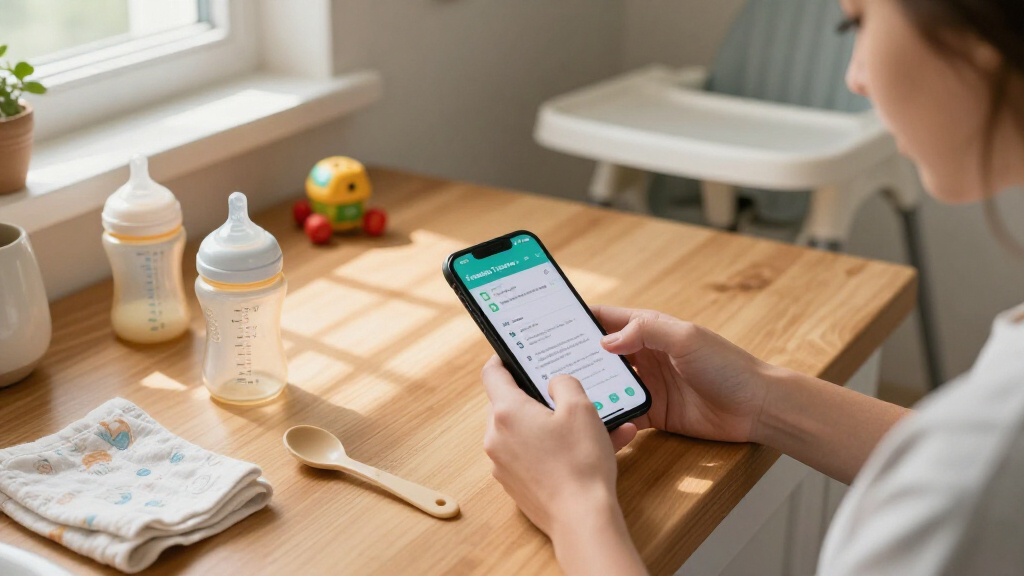
feeding tracker app with barcode scan
As an affiliate, we earn on qualifying purchases.
As an affiliate, we earn on qualifying purchases.
How to Use AI and Automation to Keep Feeding Logs Simple
- Choose an app with image recognition. Some apps can analyze photos of baby bottles or plates and auto-log nutrients, saving you from manual entry. This is especially useful when your hands are full or when you want to quickly document a feeding without interrupting your busy routine.
- Set up favorites for your usual feeds—like your go-to formula or snack—and reuse them daily. This reduces repetitive input and speeds up logging, making it less of a chore and more of a quick check-in.
- Enable reminders to log feeds, so you don’t forget during busy moments. These prompts act as gentle nudges, helping you maintain consistency without relying solely on memory, which can be unreliable during chaotic days.
- Use voice input if available—say, ‘Logged a 6-ounce bottle,’ and let the app do the work. This hands-free approach can be a game-changer, especially when your hands are occupied with other tasks.
According to BabyUI, recent AI improvements make photo-based logging 50% faster and more accurate—especially useful during those chaotic mornings. This efficiency can significantly reduce the frustration associated with manual entries, making it easier to stick with logging routines.
Pro tip: Pair your feeding app with a wearable or smart scale to automatically update weight or feeding data, giving you a comprehensive view without extra effort. This integration minimizes manual input, reduces errors, and provides a richer dataset for tracking your child’s growth and feeding patterns—crucial for early detection of feeding issues or growth concerns.
Why this matters: Automation reduces the cognitive load on parents, making regular logging sustainable even during stressful or busy periods. However, it’s important to recognize that automation tools are not infallible; over-reliance without occasional manual checks may lead to unnoticed errors. The tradeoff is between convenience and accuracy, so balancing automation with occasional review ensures reliable data and peace of mind.
As an affiliate, we earn on qualifying purchases.
Comparing Top Feeding Apps: Which One Fits Your Routine?
| Feature | App A | App B | App C |
|---|---|---|---|
| Ease of logging | Barcode scan + quick-add | Photo recognition + voice input | Manual entry + favorites |
| Customizable alerts | Yes | No | Yes |
| Data privacy focus | High | Moderate | High |
| Integration with other devices | Limited | Excellent (wearables & scales) | None |
Choosing the right app depends on your priorities. If speed matters, barcode scanning and favorites save time. If your routine involves lots of photos or voice commands, pick an app with those features. Always check privacy policies—your feeding data is personal. Remember, the best app is the one that seamlessly fits into your routine and respects your privacy, ensuring you stay consistent without compromising security.
Additional insight: Consider how each app’s approach to privacy and device integration can impact your daily use. For example, an app with strong privacy protections might limit some automation features but provide peace of mind. Conversely, an app with extensive device integration can streamline data collection but may require more permissions and trust. Weigh these tradeoffs based on your comfort level and needs.
automatic feeding journal for infants
As an affiliate, we earn on qualifying purchases.
As an affiliate, we earn on qualifying purchases.
Making Feeding Logging Less of a Chore: Practical Tips for Busy Parents
- Keep it simple: Log only what’s necessary—focus on feeding times and amounts, not every detail. Overcomplicating entries can lead to burnout or skipped logs, which diminishes the usefulness of the data. Prioritize key information that helps you identify patterns or issues.
- Create routines: Log feeds at predictable times, like after diaper changes or nap times. Establishing a routine reduces cognitive load and makes logging habitual, increasing accuracy and consistency.
- Use quick-entry features: Favorites, barcode scans, or voice input cut down logging time. These features are designed to streamline the process, but their effectiveness depends on how well they fit your specific routine and preferences.
- Set reminders: Gentle alerts help maintain consistency without mental effort. These reminders serve as external cues, reducing reliance on memory and helping to develop a habit, which is crucial during busy or stressful periods.
- Don’t aim for perfection: Even partial logs give valuable insights and keep you sane. Recognize that no system is perfect; the goal is to gather enough data to make informed decisions without becoming overwhelmed by the need for exhaustive detail.
Real-world example: One parent sets a recurring reminder for every feeding, and by sticking with it, they found they could monitor patterns and catch issues early—without obsessing over perfect data. This approach emphasizes progress over perfection, making the process sustainable and less stressful.
Why this matters: When logging becomes manageable and integrated into your routine, it’s more likely to be sustained. Consistent, even if imperfect, data collection can reveal trends and early warning signs that might otherwise go unnoticed. The tradeoff is balancing thoroughness with practicality—prioritizing consistent logging over exhaustive detail to maintain your sanity and get useful insights.
As an affiliate, we earn on qualifying purchases.
What Are the Risks of Relying Too Much on Feeding Apps?
Feeding apps are helpful, but they’re not foolproof. Relying solely on them can lead to missed feeds if the app crashes or if you forget to log. Sometimes, data inaccuracies creep in—like scanning errors or forgotten entries. These inaccuracies can distort your understanding of your child’s feeding patterns, leading to misinterpretations that might impact feeding decisions or cause unnecessary concern.
For example, a parent once logged a bottle as 8 ounces instead of 6, skewing their tracking. Over time, these small errors can accumulate, creating a false picture of overfeeding or underfeeding, which might prompt unnecessary adjustments or worries. This highlights that data is only as good as its accuracy and completeness.
According to BabyUI, the best approach is to use apps as a guide, not a gospel. Trust your judgment and stay flexible. Apps should support your routine, not replace your instincts. Recognizing their limitations ensures you don’t overdepend on technology, which could lead to overlooking subtle cues or changes that only you can notice. The tradeoff is maintaining a healthy balance—using tech to inform, not replace, your natural parenting instincts.
How Long Should You Keep Tracking? When to Step Back
Tracking is most useful in short bursts—say, a week or two—to identify patterns or troubleshoot feeding issues. Once you understand your child’s habits, you can reduce the frequency or stop altogether. Prolonged tracking beyond initial insights can lead to fatigue and diminish the perceived value of the effort, potentially causing you to abandon the routine altogether.
For example, if your baby is feeding irregularly, a two-week log can help you spot the cause—like a growth spurt or teething discomfort. After that, you may only need to check in sporadically or rely on your instincts, which are often more nuanced and immediate than data. Continuing to track long-term may provide little additional benefit and could even distract from more instinctive parenting responses.
According to experts, long-term tracking can become a distraction. Instead, focus on the insights gained during shorter periods, then trust your intuition to guide ongoing decisions. Recognizing when to step back helps prevent burnout and keeps your focus on your child’s overall well-being rather than just data points.
Frequently Asked Questions
Which feeding tracker app is best for a busy parent?
Look for apps with quick-entry options, like barcode scanning or favorites, and features that sync with other devices. Prioritize ease of use over bells and whistles—your routine, not your gadget, should lead.
How often should I log feeds to stay accurate but not overwhelmed?
Daily logging during a short period—like a week or two—can reveal patterns. After that, reduce frequency or stop if routines are stable. Consistency is more important than perfection.
Can I rely solely on feeding apps for medical concerns?
No, feeding apps are helpful tools but shouldn’t replace pediatric advice. Use them to monitor trends and share data with your pediatrician, but always trust your instincts and professional guidance.
Are feeding tracker apps safe for my child’s data?
Most reputable apps prioritize privacy and security. Always review privacy policies and permissions before using, and avoid sharing sensitive info unless necessary.
When should I stop tracking feeds long-term?
Once you identify consistent patterns or resolve initial concerns, you can reduce tracking. Think of it as a short-term tool—use it to inform your routine, then let intuition take over.
Conclusion
Feeding tracker apps can be a lifesaver—if you keep them simple and realistic. Focus on what’s truly helpful, like quick entries and automation, rather than obsessing over perfect data. The goal is to support your parenting, not add stress.
Imagine a world where feeding logs are a tool, not a burden—where technology acts as an assistant, not an obstacle. That’s the balance you’re aiming for. Keep it straightforward, trust your gut, and let your feeding routine be a source of confidence, not chaos.
Columbus Day / Indigenous Peoples' Day Picks
long weekend sales
As an affiliate, we earn on qualifying purchases.