
TL;DR

Turn the school run and nap time into listening time
- Thousands of audiobooks, podcasts and originals
- Listen on your phone, tablet or Echo — also offline
- Cancel anytime
To prevent sleep data gaps, plan charging during times when your tracker isn’t in use, use recommended chargers, and stay aware of battery health. Good habits keep your sleep insights complete and accurate.
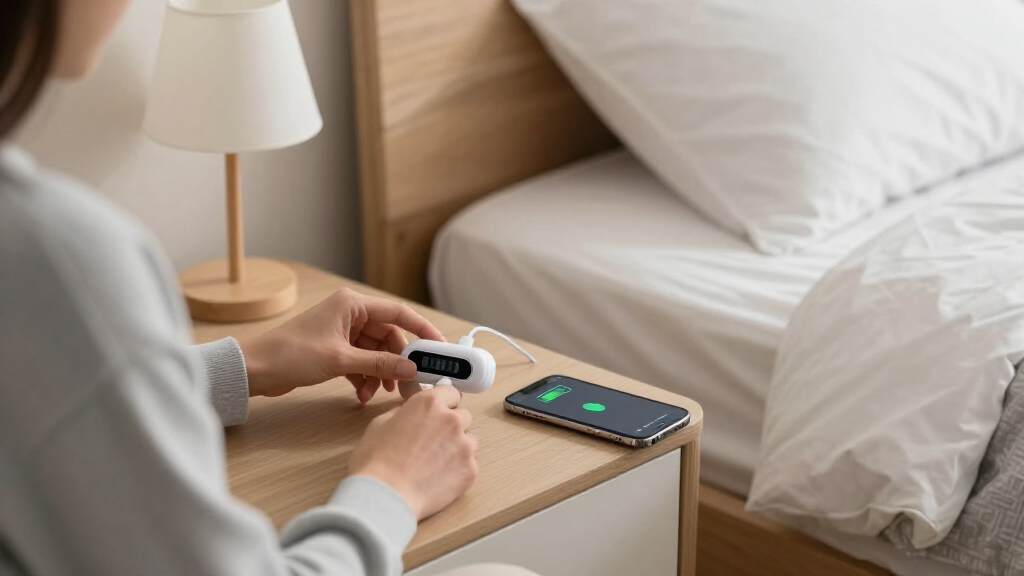
If you rely on a sleep tracker, you’ve probably wondered how to keep it running without losing important sleep data. The secret isn’t just in the device itself, but in how and when you charge it. A tiny habit—charging at the right moment—can make all the difference between a complete sleep picture and frustrating gaps.
In this guide, you’ll learn the best practices for managing your sleep tracker’s battery life and charging routine. From understanding battery capacity to smart charging tricks, you’ll discover how to keep your sleep data seamless and trustworthy, night after night.
Plan your charging during times when your tracker isn’t actively monitoring sleep to avoid gaps.
Use the device’s recommended chargers and avoid letting the battery fully drain to prolong lifespan.
Recent tech improvements, like fast charging and extended battery life, make continuous sleep tracking easier.
Regularly check your device’s battery health—signs of degradation include shortened run time and unexpected shutdowns.
Smart charging habits can significantly improve sleep data accuracy and device longevity.
Why Your Sleep Tracker’s Battery Life Matters More Than You Think
Your sleep tracker’s battery isn’t just about keeping it powered—it’s about ensuring your sleep data is complete and trustworthy. When the battery dies mid-sleep, you miss out on crucial insights that could affect your understanding of sleep quality and patterns. For instance, if your device only lasts 1-2 days on a charge, neglecting to recharge it can result in gaps during key sleep hours, leading to incomplete or skewed data. This incomplete picture can mislead you about your sleep health, potentially prompting unnecessary worry or overlooked issues.
Understanding your device’s battery capacity and typical usage helps you anticipate when to recharge proactively. The tradeoff often involves balancing convenience with data integrity—charging too infrequently might save you time but risks losing valuable sleep information, while frequent charging can be inconvenient but ensures continuous tracking. Recognizing this balance is essential for making informed decisions that maximize your device’s effectiveness and your sleep insights.
Popular right now

Ninja DualZone Smart Air Fryer, 10 Qt, 6-in-1, DZ950

De'Longhi Dinamica Plus Fully Automatic Espresso Machine

Ninja Foodi Air Fryer 10 Qt DualZone 6-in-1 Black DZ302
As an affiliate, we earn on qualifying purchases.
How to Charge Your Sleep Tracker Without Missing Data
- Identify the device’s typical battery life—know whether it lasts 1 day, 3 days, or a week. This helps you plan charging sessions so they don’t coincide with critical sleep periods, preventing data gaps.
- Choose times when the device isn’t actively tracking—perhaps during the day when you’re awake or during activities that don’t require sleep data. Charging during these windows minimizes interruption and ensures your tracker is ready for the night.
- Use recommended chargers and cables—avoiding cheap third-party options reduces the risk of damaging the battery or causing inconsistent charging, which can shorten battery lifespan and affect data accuracy.
- Charge quickly if possible—many newer trackers support fast-charging, which allows you to top up the battery in 15-30 minutes, giving you flexibility without lengthy downtime.
- Set reminders or routines—like charging right after waking up or during a shower—so that charging becomes a regular, predictable part of your day, reducing the chance of forgetting or delaying.
For example, if your tracker’s battery lasts 3 days, plan a quick top-up mid-way through the second day. Charging while you’re active and awake ensures you don’t miss tracking during sleep hours, maintaining data continuity. Remember, charging during sleep hours should only be done if your device is designed for it, as improper charging can risk overheating and data loss.
Best Charging Habits That Keep Your Sleep Data Complete
| Habit | Why It Works |
|---|---|
| Charge during waking hours | Charging when awake minimizes the risk of mid-sleep shutdowns, which can cause data gaps. It also allows you to monitor the charging process, avoiding overheating and ensuring the device is fully prepared for the next sleep cycle. This habit maintains the continuity of your sleep data, enabling more accurate analysis and insights. The tradeoff is that it requires planning, but the benefit of seamless data outweighs the inconvenience. |
| Avoid full discharges | Deep discharges strain the battery’s chemistry, leading to faster capacity loss and unpredictable shutdowns. By keeping the battery between 20-80%, you preserve its health, which in turn sustains consistent data collection over time. This approach can extend the overall lifespan of your device, reducing the frequency and cost of replacements, and ensuring your sleep data remains reliable for longer periods. |
| Use fast chargers when available | Fast charging provides quick top-ups, often in 15-30 minutes, which is especially useful when you’re short on time. This minimizes downtime and keeps your device ready for sleep tracking without significant interruption. However, frequent fast charging can generate more heat, which may degrade battery health if not managed properly. Balancing quick top-ups with regular, gentle charges helps maintain long-term battery health while ensuring consistent data collection. |
| Keep chargers original | Using manufacturer-approved chargers ensures safe, efficient charging that preserves battery integrity. Incompatible or cheap chargers may deliver inconsistent power, risking damage or reduced lifespan. Properly maintained batteries support accurate sleep tracking by preventing unexpected shutdowns and data gaps. This practice is an investment in both device longevity and data reliability, avoiding the tradeoff between convenience and accuracy. |
| Monitor battery health | Regularly checking your battery’s capacity and performance helps you identify signs of wear—such as shorter run times or longer charging cycles—before complete failure. Replacing the battery or upgrading your device at the right time prevents unexpected shutdowns that could cause data loss. Maintaining optimal battery health ensures your sleep data remains consistent and trustworthy over the life of your device, avoiding the tradeoff of relying on a degraded battery that skews insights. |
Adopting these habits isn’t just about convenience; it’s about actively preserving the accuracy and completeness of your sleep data. Planning ahead and maintaining good charging routines allow your device to function optimally, providing you with reliable insights that can inform better health decisions.
Some devices now feature intelligent charging systems that adapt to your habits, optimizing battery health over time. Utilizing these features can further extend the accuracy and lifespan of your sleep tracker, making your routine both smarter and more sustainable.
What Happens When You Ignore Charging Tips? Real Risks
If you neglect good charging practices, you risk losing important sleep data that can impact your understanding of your sleep health. A dead battery during the night causes gaps in tracking, missing crucial sleep stages like REM and deep sleep, which are vital for assessing overall sleep quality. These omissions can lead to inaccurate or incomplete sleep reports, making it difficult to identify issues or improvements.
Imagine waking up after a restless night, only to discover your tracker shut off at 2am. The missing data might obscure patterns like frequent awakenings or poor sleep continuity, leading you to misjudge your sleep health. Over time, repeated neglect—such as letting batteries fully drain or charging improperly—can cause irreversible battery degradation, resulting in more frequent replacements and higher costs. This not only affects your device’s longevity but also compromises the reliability of your sleep insights. The tradeoff is clear: investing a little effort in proper charging can prevent these issues, ensuring your sleep data remains comprehensive, accurate, and useful for health decisions.
How Advances in Battery Tech Are Making Sleep Tracking Easier
Recent innovations in battery technology have significantly improved the reliability of sleep trackers. Many now feature batteries that can last up to a week on a single charge, reducing the need for daily recharging and minimizing the risk of data gaps. Fast-charging capabilities enable you to boost the battery quickly, often in just 15 minutes, which is especially convenient for busy routines. Wireless charging pads and solar-powered options are emerging, offering more seamless and flexible ways to keep your device powered without interrupting your sleep schedule.
These technological advances mean less hassle and more consistent data collection, allowing for more accurate long-term sleep analysis. For example, a tracker with a 7-day battery and smart charging features can be integrated into your daily routine—charging during your morning routine or while doing other activities—so you’re always ready for a full week of sleep tracking without interruption. Moreover, smart algorithms now optimize battery health, similar to smartphones, which helps maintain accuracy over time and reduces the need for frequent replacements. These innovations collectively make sleep tracking more reliable, convenient, and sustainable for users.
Signs Your Sleep Tracker Needs a Battery Check or Replacement
Knowing when to replace your sleep tracker’s battery is crucial for maintaining data accuracy. Watch for signs such as a significant decrease in battery life—where the device now lasts less than half of its original capacity—unexpected shutdowns during sleep, or inconsistent sleep data that suddenly appears incomplete. Longer charging times than usual also indicate declining battery health. Physical signs like swelling or corrosion are clear warnings that the battery is failing and could damage the device if not addressed promptly. For example, if your tracker used to last 5 days but now only lasts 2, it’s a clear signal that the battery’s capacity has diminished and needs attention. Replacing the battery or upgrading your device at this point can restore accuracy, prevent future data gaps, and prolong the overall lifespan of your sleep tracker, ensuring your sleep insights remain dependable.
Quick Tips to Keep Your Sleep Data Flowing Smoothly
- Plan your charging during active hours, not overnight, to prevent unexpected data gaps caused by battery depletion during sleep.
- Use manufacturer-approved chargers to ensure safe, efficient charging that preserves battery health and data accuracy.
- Set reminders for regular top-ups to develop a consistent routine, reducing the chance of forgetting or delaying charging, which can lead to data loss.
- Monitor your device’s battery health periodically—if you notice decreasing performance, consider replacements or upgrades to maintain data integrity.
- Consider newer models with longer battery life or faster charging capabilities to minimize interruptions and maximize data reliability.
Think of your sleep tracker as a nightly companion—treat it with routine care and attention, and it will provide you with years of clear, complete sleep insights. Proper maintenance isn’t just about convenience; it’s about safeguarding the accuracy of your health data and making informed decisions based on trustworthy information.
Frequently Asked Questions
How often should I fully charge my sleep tracker?
It depends on your device’s battery life. Many trackers last 2-7 days—charge when you notice the battery drops below 20%, or at least once a week to keep it in top shape.Is it safe to charge my sleep tracker while I sleep?
Most trackers are designed for overnight charging, but check your device’s instructions. Use the original charger and avoid covering it with bedding to prevent overheating.What’s the best way to prevent battery degradation?
Keep the battery between 20-80% charge, avoid full discharges, and don’t leave it plugged in at 100% for long periods. Regularly updating your device’s firmware can also help.Can I wear my sleep tracker while charging?
It’s generally best to remove the tracker while charging, especially if it’s wired. Some wireless chargers allow you to wear the device during charging, but always follow the manufacturer’s guidelines.What are the signs my tracker’s battery is failing?
Shorter battery life, longer charging times, unexpected shutdowns, or physical signs like swelling indicate it’s time for a replacement or upgrade.Conclusion
Keeping your sleep tracker charged wisely isn’t just about convenience—it’s about trust. When you plan your charging routine and stay on top of battery health, you ensure your sleep insights stay complete and reliable.
Think of your sleep data as a story of your nights. A small habit like smart charging keeps that story whole, helping you understand and improve your rest. Your best sleep data is just a good charge away.