
TL;DR

Turn the school run and nap time into listening time
- Thousands of audiobooks, podcasts and originals
- Listen on your phone, tablet or Echo — also offline
- Cancel anytime
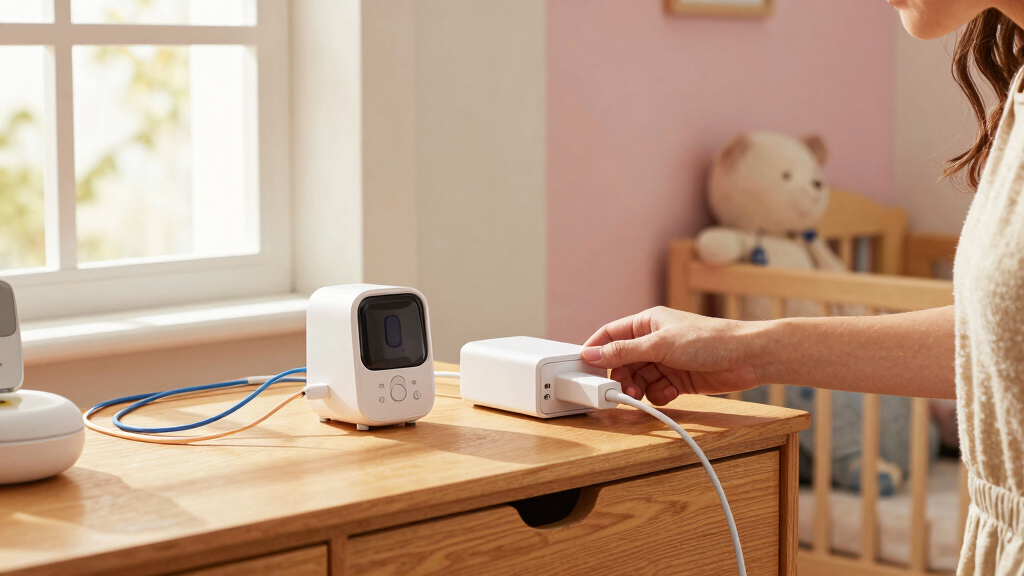
A nursery charging hub centralizes all baby tech devices, reducing clutter and boosting safety. Modern options include smart, wireless, and modular solutions tailored for busy parents.
Imagine a busy morning, your baby cries, and you need to quickly grab the monitor, check the thermometer, or turn on a night light. All these devices demand power, but tangled cords and clutter make it a hassle. Setting up a nursery charging hub isn’t just about convenience—it’s about safety, peace of mind, and keeping your nursery calm and clutter-free.
In this guide, you’ll learn how to create a dedicated space that holds all your baby tech, from monitors to wearable devices. You’ll get practical tips on choosing the right setup, managing cords, and integrating new tech, so you can focus on what matters most—your little one.
A dedicated nursery charging hub keeps your tech organized, safe, and easily accessible, reducing clutter and hazards.
Safety features like child-proof outlets, surge protectors, and cable management are essential for protecting your baby and devices.
Wireless and modular charging options are growing, offering convenience and flexibility as your nursery tech evolves.
Organizing cords with clips, sleeves, and hidden outlets prevents tripping and keeps your nursery looking calm.
Choose a charging setup that matches your nursery style and future needs—simplicity now saves headaches later.
Setting Up a Nursery Charging Hub for All the Baby Tech
A dedicated charging zone keeps monitors, thermometers, night lights, sensors and wearables powered without turning the nursery into a tangle of cables. The goal is simple: one parent-accessible location, protected power and cords that remain firmly out of a child’s reach.
Build the hub around your real device mix
Count today’s devices, note their connectors and leave room for tomorrow. A small amount of planning prevents a patchwork of adapters, overloaded sockets and chargers spread across the nursery.
Assess every device
List monitors, thermometers, night lights, wearables and sensors. Record how often each item needs charging and whether it must remain powered continuously.
Prioritize safety
Choose child-resistant outlets, surge protection, resettable circuit protection and an enclosure made from heat-resistant, non-toxic materials.
Match connections
Confirm the required mix of USB, USB-C and AC outlets. Check voltage and charging specifications instead of assuming every cable or adapter is interchangeable.
Choose the safe zone
Place the hub where adults can reach it easily but children cannot. Keep it away from the crib, changing area, liquids, fabric piles and direct heat.
Plan for growth
Reserve spare capacity or use a modular system. New cameras, sound machines and wearables can then be added without rebuilding the entire setup.
Blend it into the room
Use a compact shelf, charging drawer or ventilated cable box that complements the nursery. A discreet hub is easier to maintain as part of the daily routine.
Choose convenience without losing control
No single format suits every nursery. A wired multi-port hub offers broad compatibility, while wireless, smart and modular systems add convenience for supported devices.
| Hub type | Device compatibility | Cable reduction | Best use | Watch for |
|---|---|---|---|---|
| Multi-port wired | ✓Broad with the right ports | ~Centralizes rather than removes | Mixed USB, USB-C and AC devices | Port count, output limits and cable routing |
| Wireless pad | ~Only supported devices | ✓Strong reduction at the surface | Compatible wearables and phones | Alignment, heat and slower charging |
| Smart station | ✓Varies by port selection | ~Depends on configuration | Status alerts and remote control | App dependence, privacy and updates |
| Modular system | ✓Expandable over time | ✓Can consolidate new devices | Growing baby-tech collections | Module availability and total footprint |
| Loose chargers | ✓Device-specific | ✗High clutter potential | Temporary or travel use | Exposed sockets, tangles and lost adapters |
Compatibility check: Wireless charging is convenient but not universal. Confirm the device manufacturer’s charging requirements before placing any baby monitor, wearable or sensor on a third-party charger.
A clean route from outlet to ready device
Installation is less about adding power and more about controlling access, heat and cable movement. Follow the route in order, then test it from a child’s-eye level.
Count
Map devices, connectors and charging frequency.
Position
Select a dry, ventilated, adult-accessible location.
Protect
Add child resistance and suitable surge protection.
Route
Clip, sleeve, label and hide every cable run.
Test
Check heat, reach, stability and charging status.
Make every cable intentional
Priority scale for a nursery-safe setup
Organization creates a calmer nightly loop
When devices have assigned ports and cables have clear routes, each handoff becomes easier to verify. That reduces searching and helps keep essential tech ready when the baby needs attention.
The simplest reliable system wins.
A charging hub does not need to be complicated. Start with protected power, sufficient ports, a stable surface and cable control. Add wireless, smart or modular features only when they solve a real compatibility or workflow need.
Final five-point check
- Hub and cords are inaccessible from the crib or floor.
- Power capacity matches every connected device.
- Adapters have airflow and remain cool in normal use.
- Cables are clipped, sleeved or enclosed along the full route.
- At least one port remains available for future nursery tech.
Why a Nursery Charging Hub Makes Your Life Easier
A nursery charging hub centralizes all your baby devices—think monitors, sensors, night lights, and wearables—in one safe, accessible spot. It reduces the chaos of cords sprawling across surfaces, which is crucial not only for tidiness but for safety. When cords are organized and out of reach, it minimizes the risk of accidental unplugging or tripping hazards that could harm your baby. Additionally, it saves you time during those frantic moments when you need a device quickly, since everything is in one designated area. This consolidation also helps you monitor battery levels more effectively, ensuring devices are always ready when needed, which is vital for maintaining a calm, responsive environment for your little one.
For example, one parent set up a dedicated shelf with labeled ports for each device, so she knew exactly what was charging and what was ready. It cut her nightly routine in half and kept cords out of her baby’s reach. Such organization not only streamlines daily routines but also reduces the mental load—less searching means more peace of mind.
nursery charging station for baby devices
As an affiliate, we earn on qualifying purchases.
As an affiliate, we earn on qualifying purchases.
How to Choose the Right Charging Station for Your Nursery
- Assess your devices: Take stock of every device that needs power—monitors, thermometers, night lights, wearables, and any future tech. Understanding your current and potential needs helps determine the number of ports and power options required. This foresight prevents the need for multiple chargers cluttering your space later, which can create confusion and potential safety issues. Consider whether your devices support fast charging or need special power requirements, and choose a hub that accommodates these specifications.
- Pick safety features: Prioritize surge protectors to shield your devices from power fluctuations, especially during storms or outages. Child-proof outlets prevent little hands from poking into live sockets, reducing electrical shock hazards. Heat-resistant materials and fire-retardant enclosures add an extra layer of safety, especially if you plan to leave devices charging unattended. These features reflect a proactive approach to safety, acknowledging that nurseries are dynamic environments where accidents can happen unexpectedly.
- Match compatibility: Ensure the charging hub supports the types of connections your devices use—USB, USB-C, or AC outlets. Compatibility avoids the need for adapters or multiple chargers, which can clutter your space and introduce safety risks. Think about future-proofing by selecting a versatile hub that can handle emerging tech, so your nursery setup remains relevant as your baby’s needs evolve.
- Consider aesthetics: The look of your charging station impacts the overall nursery environment. Sleek, minimal designs that blend seamlessly with your decor contribute to a calm, uncluttered space. Conversely, bulky or mismatched units can detract from the nursery’s tranquility. Choosing a visually appealing setup encourages consistent use and helps maintain the aesthetic harmony of the room.
- Plan for growth: Babies’ tech needs expand rapidly, so opt for modular setups that can be adjusted or expanded over time. Modular hubs allow you to add extra ports, wireless chargers, or even integrate smart features without replacing the entire system. This flexibility ensures your nursery remains organized and safe as your collection of devices grows, saving money and effort in the long run.
For example, a parent with a growing collection of smart devices opted for a multi-port hub with built-in surge protection and a sleek white finish that matched her nursery’s calming palette. This adaptable choice prevented her from needing multiple new chargers and kept her space tidy and safe.
child-proof outlet surge protector
As an affiliate, we earn on qualifying purchases.
As an affiliate, we earn on qualifying purchases.
Safety First: Protecting Your Baby and Devices
| Safety Tip | Why It Matters |
|---|---|
| Use child-proof outlets | Prevents accidental shocks if little hands reach for cords, which is a common risk in nurseries. Child-proof outlets have safety shutters that only open when a plug is inserted properly, reducing the chance of curious fingers or accidental contact with live electricity. |
| Manage cords with clips or sleeves | Avoid tripping hazards and prevent babies from pulling on cords, which can cause devices to fall or get damaged. Proper cord management also keeps the cords out of reach, reducing the risk of strangulation or choking hazards. Additionally, organized cords minimize stress during diaper changes or playtime, where loose cords could be inadvertently tugged. |
| Choose surge protectors | Protects devices from power surges that can occur during storms or electrical faults. Surge protectors absorb excess voltage, preventing damage and potential fire hazards. Using high-quality surge protectors with resettable circuit breakers adds an extra layer of security, ensuring your devices stay safe and functional over time. |
| Opt for non-toxic, heat-resistant materials | Reduces the risk of burns or toxic exposure if devices heat up or are chewed by curious babies. Materials that are certified non-toxic and heat-resistant ensure that accidental contact does not result in injury or health issues, which is especially important in a nursery setting. |
One mom replaced her bare outlets with child-proof covers and added cable clips to her setup. She felt confident her baby was safe, and her devices stayed protected from power fluctuations. These measures are essential for creating a nursery environment that prioritizes safety without sacrificing functionality.
As an affiliate, we earn on qualifying purchases.
Making Cables Tidy and Out of Sight
- Cable clips: Attach to furniture or walls, guiding cords neatly behind furniture. This not only keeps cords out of reach but also prevents accidental tugging that could pull devices off surfaces or cause tripping hazards. Proper placement of clips can also reduce strain on cords, prolonging their lifespan and maintaining a tidy appearance.
- Cable sleeves: Group multiple cords into one tidy tube, reducing visual clutter and preventing tangles. This is especially useful if you have a variety of device cords running in different directions, as it consolidates them into a single, manageable bundle. It also provides an extra layer of protection against chewing or accidental damage.
- Decorative boxes or covers: Hide power strips and excess cords in attractive boxes that match nursery decor. These concealment solutions turn clutter into a stylish element that complements the room’s aesthetic. This not only enhances visual harmony but also makes it easier to keep cords out of reach of babies, reducing safety risks.
- Strategic placement: Position outlets behind furniture or inside built-in shelves to keep cords out of reach and out of sight. This placement minimizes temptation for little hands to pull or chew cords, and maintains a clean, uncluttered look. Properly planning outlet locations can significantly improve the safety and appearance of your nursery’s tech setup.
For example, one parent used decorative fabric-covered boxes to hide power strips and cords, creating a clean look that also prevented curious little hands from pulling on cables. Proper cable management is not just about aesthetics; it’s a crucial safety step that reduces hazards and promotes a calm, organized nursery environment.
As an affiliate, we earn on qualifying purchases.
Smart and Wireless Charging Ideas for Modern Nurseries
Smart and wireless tech are transforming nursery device management by offering seamless, clutter-free solutions. Wireless charging pads enable you to place compatible devices on a surface—like a shelf or nightstand—and have them charge without the mess of cords. This reduces clutter, makes daily routines smoother, and minimizes the risk of tripping over cables. Smart chargers go a step further by providing notifications when devices are fully charged or need attention, ensuring you’re always aware of your tech status without manually checking each device.
For example, a parent set up a wireless charging pad under her nursery shelf, which not only kept cords hidden but also allowed her to charge her baby monitor and wearables effortlessly overnight. The smart charger sent her alerts when the devices reached full charge, saving her from waking up to check batteries or guess when to unplug. Such integration enhances safety by reducing cable clutter and ensures devices are always ready, which is vital when managing multiple baby tech gadgets.
However, it’s important to note that not all devices support wireless charging. Before investing, verify your devices’ compatibility and consider the placement of charging pads to maximize efficiency and safety.
The Rise of Modular and Eco-Friendly Charging Hubs
Modular hubs are designed to offer customizable configurations that adapt to your evolving nursery needs. They enable you to add or remove sections—such as extra outlets, wireless charging pads, or smart features—without replacing the entire system. This flexibility is especially valuable because nursery needs change quickly as your baby grows and acquires new devices. The ability to expand or reconfigure your charging station means you can maintain safety and organization without the expense and hassle of replacing the entire setup. Moreover, many modular hubs are now made from sustainable, non-toxic materials, reflecting a growing awareness of environmental impact. Choosing eco-friendly options ensures that your nursery is not only safe for your baby but also aligned with environmentally responsible parenting practices.
Imagine starting with a simple USB port, then expanding to include a wireless charger and additional outlets as your tech collection expands. Modular systems often feature sleek, integrated designs that blend seamlessly into nursery decor, avoiding the bulky, cluttered look of traditional setups. They also typically incorporate eco-friendly materials like recycled plastics and energy-efficient components, which reduce environmental impact and promote sustainable parenting practices.
For eco-conscious parents, choosing a hub with these features means aligning safety, functionality, and sustainability. It’s an investment that supports a gentle, environmentally responsible approach to parenting, ensuring that your nursery remains a safe, stylish, and eco-friendly space for your child to grow.
Frequently Asked Questions
Can I use regular outlets for baby devices or should I get a dedicated hub?
You can use regular outlets, but a dedicated charging hub keeps everything organized, reduces clutter, and improves safety. It’s especially helpful as your nursery tech collection grows.
Are wireless chargers reliable for baby monitors and wearables?
Wireless chargers are convenient but not compatible with all devices. Always check your device’s specs before switching to wireless charging to ensure it works reliably.
How do I prevent my baby from pulling on cords?
Use cable clips, sleeves, or hide cords behind furniture or inside decorative boxes. Keeping cords out of reach and neatly organized minimizes risks and keeps your nursery tidy.
What safety standards should I look for in a nursery charging station?
Look for surge protection, child-proof outlets, and non-toxic, heat-resistant materials. These features help protect your devices and your baby from electrical hazards.
Are eco-friendly charging hubs worth it?
Yes, many eco-friendly hubs use recycled, non-toxic materials and energy-efficient components. They’re a great choice for parents who want to care for their baby and the planet.
Conclusion
Think of your nursery charging hub as the quiet backbone of a peaceful nursery. When everything has a place—charged, safe, and out of sight—you reclaim moments of calm amid the chaos. A simple, well-thought-out setup makes your mornings smoother and keeps your little one safe.
Start with a plan, pick the right tools, and keep safety front and center. Your nursery will thank you—and so will your sanity.
Evergreen bestsellers Picks
bestsellers
As an affiliate, we earn on qualifying purchases.