
TL;DR

Turn the school run and nap time into listening time
- Thousands of audiobooks, podcasts and originals
- Listen on your phone, tablet or Echo — also offline
- Cancel anytime
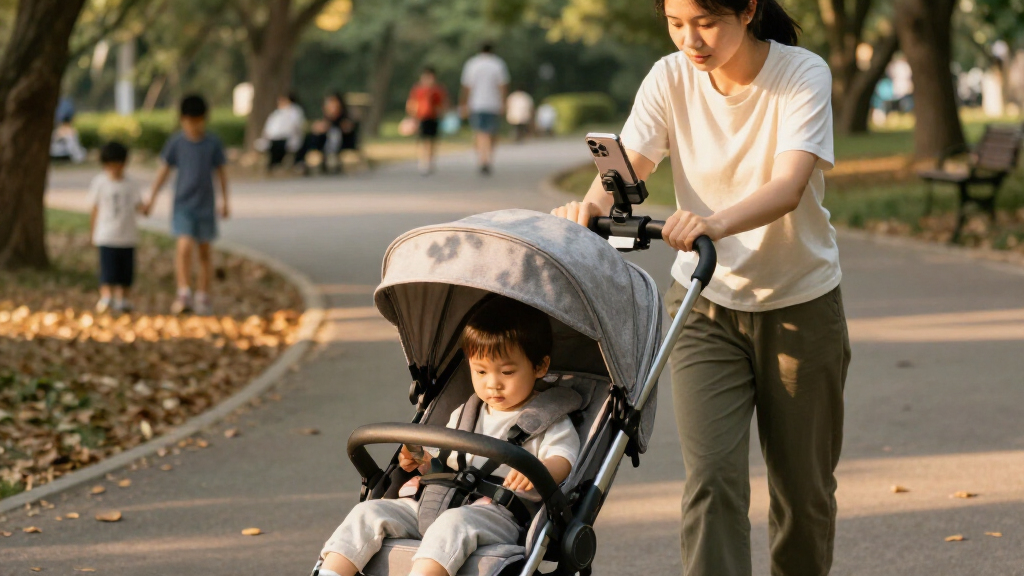
Stroller phone mounts can help when you need a map, quick music controls, or phone access on an unfamiliar walk, but they add little on a short, familiar route. Choose a mount that fits both your stroller and phone, keep your view and controls clear, and set up navigation before moving. A pocket may be the better choice if a visible screen tempts you to check it.
At the corner, your map says turn left. Your toddler has just dropped a mitten, the stroller wheels are rattling over brick, and your phone is buried under wipes. That is the moment a stroller phone mount can sound like a brilliant idea.
It can also become one more thing clamped to a crowded handlebar. A screen in the wrong spot can block your view, compete with the brake, or keep catching your eye when you should be watching the pavement. The real question is not whether a mount is useful in general; it is whether it helps on your usual outings without making the stroller harder to manage.
This guide walks through when a mount earns its space, what to check before buying, and which accessories can quietly tip a stroller from handy to awkward. You will also find practical safety and care tips, plus a simple way to decide whether the phone belongs on the handlebar, in a pocket, or zipped away.
A stroller phone mount is most helpful when you regularly need directions or quick phone access; familiar walks may call for nothing more than a pocket.
Check that the mount fits your handlebar and phone, and test its grip while the stroller is parked before relying on it outdoors.
Keep the mount clear of your child, path, brake, folding parts, and the grip you use to steer.
Set up navigation or audio before moving, and stop somewhere safe whenever you need to handle or read the phone.
Limit handlebar accessories and weight; take the phone with you when leaving the stroller and check current CPSC recalls for child products.
Stroller Phone Mounts Useful or Just Clutter?
A mount can help on unfamiliar walks, but it adds little to a familiar route. Its value depends on secure fit, clear sightlines, and whether it helps you avoid using your phone while moving.
When a mount earns its space
Choose based on how you actually use your phone on walks.
Unfamiliar routes
A mount can keep directions within reach when you need them.
Quick audio access
It can help with music controls, but set audio before setting off.
Familiar walks
A pocket may be simpler when you rarely need to check the screen.
Check fit before buying
Handlebars and phones vary, so compatibility is not universal.
Compare handlebar shape and space, plus your phone size and weight, with the mount’s stated fit.
Follow the mount and stroller instructions, then gently nudge the holder to check its grip.
From your usual pushing position, make sure the screen clears your child, path, brake, and folding parts.
Keep attention on the walk
A mount provides access; it does not make phone use while walking safe.
- Set up navigation or audio.
- Make sure your grip and controls are clear.
- Stop somewhere safe before reading or handling it.
- Use a pocket if a visible screen tempts you to check it.
Keep accessories manageable
Extra attachments can crowd the handlebar and affect steering or how the stroller sits when parked.
| Setup | What to consider |
|---|---|
| Combined holder and organizer | Fewer separate pieces, but check space, cleaning, and control access. |
| Multiple attachments or heavy bags | Can crowd your hands or affect handling; use designated storage. |
| Phone left on stroller | Exposed to weather and easier to spot or grab; take it with you. |
When a Stroller Phone Mount Actually Makes a Walk Easier
A stroller phone mount is most useful when you need quick access to directions or audio during an outing; it adds less on a short, familiar route. A map can be easier to glance at than to fish out from beneath a snack cup, especially when you are crossing an unfamiliar neighborhood. That convenience only counts if you can keep your attention on the child and the path.
Imagine walking through a new park with a sleeping baby and a route that bends around a pond. A securely mounted phone may let you check the next turn while stopped at a bench, instead of rummaging through a diaper bag. On your usual loop to the grocery store, though, the phone may stay untouched in your coat pocket. The mount would be extra hardware without a job.
Think about the moments when you actually reach for your phone. Do you use turn-by-turn directions, adjust a playlist, or check an incoming call? A mount can be handy for getting the phone within reach, but having it visible can also invite extra checking. If a screen tends to pull your attention, a pocket is a calmer choice.
There is a useful distinction here: access is not the same as hands-free attention. Start the route or music before you set off, and stop in a safe place if you need to tap, read, or answer. The stroller keeps rolling like a small shopping cart; your focus still needs to stay on what is ahead.
Popular right now

Dreame X60 Max Ultra Complete Robot Vacuum and Mop

Ninja DZ801 DualZone 6-in-1 Air Fryer, 8 Qt, Grey

Bose QuietComfort Wireless Noise-Cancelling Headphones, Cypress Green
As an affiliate, we earn on qualifying purchases.
How to Check Fit Before a Mount Goes on Your Handlebar
Stroller phone mounts work well only when the clamp or strap fits both the handlebar and the phone securely. Handlebar shape and thickness vary, as do phone size and weight, so a mount that feels firm on one stroller may twist or slip on another. Check the mount’s stated range and the stroller maker’s instructions before buying.
- Measure the available space. Check the handlebar’s shape and diameter, and note where the brake, folding latch, and other controls sit.
- Check phone compatibility. Compare your phone’s size and weight with the mount’s stated range. A bulky case can change the fit.
- Fit it while the stroller is parked. Tighten the clamp or strap according to its instructions, then see whether the holder stays put when you gently nudge it.
- Check your view and controls. Sit or stand as you normally would and confirm the screen does not block your child, the route, the brake, or any folding parts.
For example, a wide padded handlebar may not suit a rigid clamp designed for a narrow round tube. A flexible silicone strap may fit a wider range, but it still needs to hold the phone steadily and stay in place. Fit matters more than a long feature list.
Before the first walk, test the setup with the stroller stationary. Then recheck it after a short, gentle outing, especially if the path is bumpy. The phone should not wobble toward your hands or fall out when the stroller rattles over paving stones.
Keep Your Child, Path, and Stroller Controls in View
A stroller phone mount is safer to use when it leaves your view of the child and path clear and does not interfere with stroller controls. Keep the screen out of the way of the brake, folding mechanism, and the grip you need to steer. Follow both the mount and stroller manufacturers’ instructions, since placement and design differ.
Try checking the position from your normal pushing posture rather than looking at the stroller from the front. A screen that seems small while the stroller is parked can cover a curb or a child’s face once you are walking behind it. If the mount crowds your hands or makes a turn feel awkward, move it or remove it.
Even with a clear placement, a mount does not make texting, scrolling, or handling a call while walking safe. A familiar route can still bring a driveway, a cyclist, or a dropped toy into your path without warning. Set up navigation or music before starting, then stop somewhere safe when you need more than a glance.
A mount keeps your phone nearby; it does not take responsibility for where your eyes go.
Think of an afternoon walk where the map announces a turn just as a scooter zips past. Audio directions can let you keep watching the pavement, while reaching for the screen in that moment splits your attention. The useful setup is the one that gives you information with the least need to interact while moving.
Spot the Accessories That Make a Stroller Harder to Handle
Stroller accessories become clutter when they crowd the handlebar, make steering awkward, or add weight that changes how the stroller handles. A phone holder, cup holder, organizer, and bag may each seem small, but together they can leave little room for your hands and controls. Put bags in the stroller’s designated storage areas instead of piling weight onto the handlebar.
Many accessories combine a phone holder with cup holders or storage pockets. Fewer separate pieces can mean fewer clamps, which is convenient. But a combined unit still needs space, needs cleaning, and can be harder to fit around a brake or folding latch. Multi-function does not automatically mean useful.
For example, a caregiver on a long train-to-park outing may appreciate an organizer for wipes and a phone holder for a route. On a quick walk around the block, the same setup may crowd the grip and collect crumbs from a snack pouch. Which accessories help depends on your day, and how easily you can remove and clean them matters too.
Check that attachments do not obstruct your view or change the way the stroller steers or sits when parked. If the front wheels feel harder to guide, or the stroller tips more easily when empty, remove extra weight and use its storage basket. Leave only the accessories you reach for often enough to justify their space.
Decide Between a Handlebar Mount and a Pocket
A handlebar mount gives quicker visual access, while a pocket or bag keeps your phone less visible and may suit you better when you do not need directions on screen. The tradeoff is simple: the mount can make a map easy to check, but a visible phone can invite distraction and be easier for someone else to spot. There is no single best choice for every walk.
| Option | Works well when | Watch for |
|---|---|---|
| Handlebar mount | You use directions on unfamiliar routes or want quick access while stopped. | Fit, visibility, handlebar crowding, weather, and distraction. |
| Coat pocket | You know the route and want the phone close without a visible screen. | It may be harder to reach, especially with gloves or a full bag. |
| Zipped bag pocket | You will mainly listen to audio or only need the phone occasionally. | Retrieving it takes longer, so stop safely before using it. |
Picture a rainy school run with one hand managing a hood and the other steering. A phone tucked into an accessible zipped pocket may be easier to protect than a screen exposed at the handlebar. On an unfamiliar walk where you expect several turns, a mount might be more convenient if its position and fit are right.
Try the least complicated option first. If your phone stays in your pocket for three ordinary walks, you have learned something useful: you may not need the mount after all. If you keep needing the map and can safely stop to check it, a secure mount may earn its place.
Protect Your Phone From Rain, Heat, and Easy Theft
A mounted phone is exposed to weather and easier to spot or grab than a phone tucked away. Rain can leave a slick screen and damp mount; direct sun can heat the phone; cold can affect comfort and battery life. Check your phone and mount instructions for care and temperature guidance, and do not assume an open holder protects the device.
Consider a sunny stop at a playground: while you are helping your child down from the stroller, the phone sits in bright light. If you are leaving the stroller, take the phone with you rather than leaving it on the handlebar. A visible device can attract attention in a busy public place, even when you will only be away for a minute.
A cover may help with light splashes if the mount and phone remain compatible, but bulky covers can change how firmly a holder grips. Test the complete setup while parked. If rain starts and the phone becomes slippery or difficult to see, put it away and rely on audio or wait until you are sheltered before checking directions.
Make weather and theft part of the decision, not an afterthought. A mount used only for dry, planned walks may suit you. If your routine often involves sudden showers, crowded stops, or leaving the stroller unattended, a zipped pocket may provide more peace of mind with fewer pieces to manage.
Know What to Check Before You Buy and Use Any Accessory
Before buying a stroller phone mount or another accessory, check compatibility, manufacturer guidance, care instructions, and current safety notices. A product listing cannot tell you whether the mount will fit your particular handlebar or leave your controls clear. Product designs and notices can change, so check current information for both the accessory and your stroller.
Use this quick check before each new attachment becomes part of the routine:
- Fit: Does it match the handlebar and phone dimensions, including your phone case?
- Position: Can you see your child and the path, and reach the brake and grip normally?
- Stability: Does the mount hold its position during a stationary check and after a gentle test walk?
- Load: Are bags and accessories in designated storage, without extra handlebar weight?
- Care: Can you wipe it clean, and do you know how the maker says to care for straps, clamps, and joints?
- Safety notices: Check current CPSC recall notices for child products and any relevant stroller or accessory safety alerts before use.
For instance, a silicone strap may collect dust or lose its grip as it wears. Check it now and then for damage, and wipe away dirt or moisture that could make it slip. If the mount shifts, cracks, or no longer holds the phone firmly, stop using it until you can address the fit or replace it.
Age-appropriateness matters for child products such as stroller toys or accessories a child can reach. Check the product’s age guidance and recall status, and follow the manufacturer’s directions. For infant sleep, feeding, or medical questions on an outing, follow your pediatrician’s guidance rather than relying on an accessory or a phone app.
Frequently Asked Questions
Are stroller phone mounts safe to use?
A mount can be used more safely when it fits securely and does not block your view of the child, path, or stroller controls. It does not make texting, scrolling, or taking a call while walking safe. Set up audio or directions before you move, and stop somewhere safe if you need to interact with the phone.
Will a stroller phone mount fit every stroller and phone?
No. Handlebars vary in shape and thickness, and phones vary in size, weight, and case bulk. Check the mount’s stated dimensions and your stroller maker’s instructions, then test the installed holder while the stroller is stationary.
Will my phone fall out on a bumpy path?
It depends on the mount’s grip, your phone and case, and the terrain. Test the fit while parked, then check whether the holder has shifted after a short walk. If it wobbles or slips, remove it instead of trusting it on rough ground.
Can I use a phone mount with an organizer or cup holder?
Sometimes, but handlebar space is limited. Make sure the attachments do not crowd your hands, block the brake or folding parts, or obstruct your view. Put heavier bags in the stroller’s designated storage rather than hanging more weight on the handlebar.
Should I leave my phone mounted when I park the stroller?
Take the phone with you when you leave the stroller, especially in a busy public place or in extreme weather. A mounted device is more visible and exposed to rain, heat, and cold than one tucked into a bag.
Conclusion
Give each stroller accessory a job before you give it handlebar space. If a mount helps on your regular routes, fits securely, and leaves your view and controls clear, it can be a useful tool. If it mostly holds a glowing screen you do not need, a pocket is simpler.
Set up the map before the wheels start rolling, then keep your eyes on the path and the little passenger beside it. The best stroller setup is the one that lets the walk feel like a walk again.