
TL;DR

Turn the school run and nap time into listening time
- Thousands of audiobooks, podcasts and originals
- Listen on your phone, tablet or Echo — also offline
- Cancel anytime
A minimal travel tech kit for grandparents includes a simple tablet or smartphone, portable charger, Wi-Fi hotspot, and voice assistant. It’s designed for ease, portability, and staying connected—making visits smoother and more enjoyable.
Traveling to visit grandchildren shouldn’t mean hauling a mountain of gadgets or complicated setups. Yet, many grandparents end up overwhelmed by tech that’s too bulky, confusing, or unreliable. The secret? A minimalist tech kit designed specifically for ease and portability. Think of it as a lightweight toolkit that fits in a small bag, yet keeps seniors connected, entertained, and safe.
In this guide, you’ll learn how to craft a simple, effective setup that prioritizes what truly matters—easy communication, quick access, and peace of mind—without drowning in unnecessary gadgets. Whether your loved ones are tech shy or just prefer straightforward solutions, this setup makes travel smoother and visits more meaningful.
Focus on lightweight, user-friendly devices—large screens, simple interfaces, and long battery life are essentials.
Pre-setup with clear instructions makes technology accessible, reducing frustration and support calls.
Include practical accessories like portable chargers and protective cases to ensure reliability and ease of handling.
Prioritize security with updates, strong passwords, and safe internet habits, especially when using public Wi-Fi.
Budget wisely—most travel tech kits cost around $150 to $400, with choices depending on individual needs.
What Devices Make Up a No-Fuss Travel Tech Kit for Grandparents?
The core of a minimal travel setup is a device that’s intuitive, lightweight, and reliable. Think of it as your grandparents’ digital Swiss Army knife—simple to operate and versatile enough for calls, photos, and even some light browsing.
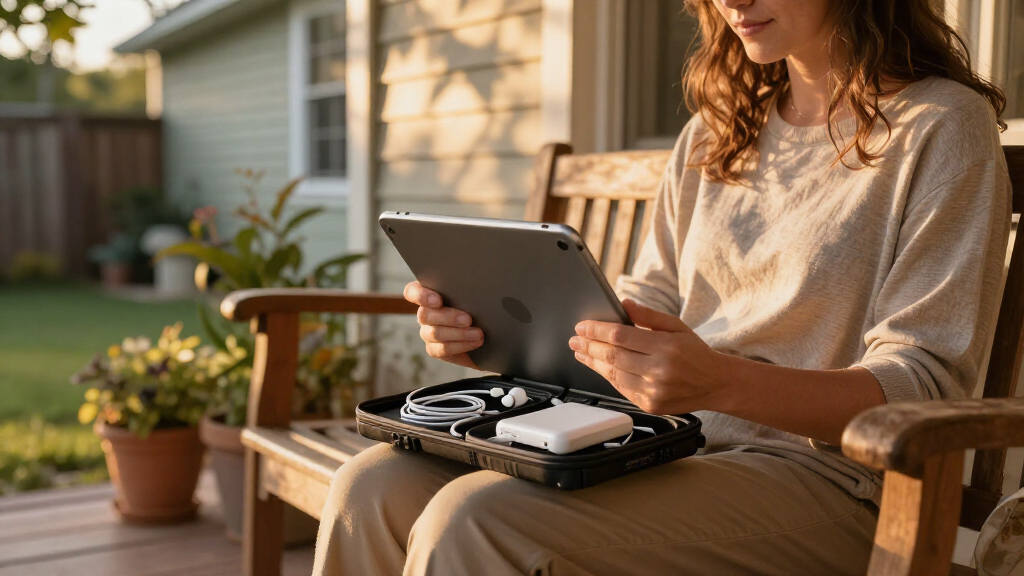
Popular options include the Amazon Fire HD tablets and basic iPads with accessibility features. These devices offer large, bright screens and straightforward interfaces that reduce frustration. Pair them with a portable charger—a small, high-capacity power bank that keeps devices running during long outings or travel days. This choice matters because it extends usability without adding bulk, ensuring devices remain functional when outlets aren’t available, which is crucial during travel.
For communication, a smartphone might be enough if your grandparents already have one. Otherwise, a tablet with cellular capability or a dedicated device with a SIM card ensures they stay connected even outside Wi-Fi zones. The key tradeoff here is balancing simplicity and connectivity—more capable devices can be more complex but offer greater independence, so choose based on comfort and needs.
Popular right now

Ninja DualZone 6-in-1 Air Fryer, 8-Qt, Grey, DZ801

KitchenAid Artisan 5-Qt Tilt-Head Stand Mixer – Almond Cream (KSM150PS)

De'Longhi 15-Bar Pump Espresso Machine with Milk Frother & Temperature Control
As an affiliate, we earn on qualifying purchases.
How to Set Up Devices So Grandparents Can Use Them Without Frustration
- Pre-install essential apps: Video calling (like Zoom or FaceTime), messaging (WhatsApp), and photo sharing. Keep icons large and simple to reduce confusion and make navigation intuitive, which is vital for seniors who may struggle with small screens.
- Create straightforward user accounts with easy-to-remember passwords or biometric login if available. This minimizes the risk of lockouts and supports quick access, especially during emergencies or time-sensitive moments.
- Adjust display settings: Increase font size, turn on accessibility options like voice-over or magnification. These modifications can significantly reduce eyestrain and make interactions more comfortable, especially for users with visual challenges.
- Write clear, step-by-step instructions—preferably laminated or saved as a note—on how to turn devices on, open apps, and connect to Wi-Fi. Clear instructions empower grandparents to troubleshoot minor issues independently, which reduces frustration and support calls.
- Do a quick run-through before traveling. Make sure they can make a call, open a photo, and shut down the device comfortably. Practicing these steps ensures confidence and familiarity, minimizing anxiety when they need to use the device in real situations.
For example, a grandma visiting her grandson’s house might need to quickly open the video app to say good morning. Setting everything up in advance turns this into an effortless 30-second task rather than a frustrating search for buttons. This preparation reduces stress and makes technology a helpful tool rather than an obstacle.
Essential Accessories That Keep the Setup Simple and Reliable
- Portable charger: A compact, high-capacity power bank (10,000 mAh or more) guarantees extra juice during long days out. This ensures devices won’t die unexpectedly, which could leave grandparents disconnected or unable to navigate emergencies.
- Protective case: Durable, easy-to-hold cases prevent accidental drops and make devices easier to grip. Good protection minimizes repair costs and prolongs device lifespan, which is especially important when traveling where repairs aren’t always easy to arrange.
- Screen magnifier: Clear plastic or glass magnifiers help grandparents with visual challenges enjoy content comfortably. This simple addition reduces eye strain and makes reading or viewing content easier, encouraging more frequent use and engagement.
- Wi-Fi hotspot or SIM card: A dedicated portable Wi-Fi device ensures consistent internet, especially in places with weak or unreliable home Wi-Fi. Reliable connectivity is essential for staying in touch and accessing information without frustration, which can be a major concern during trips.
For example, a simple clip-on magnifier can turn a small screen into a giant, easy-to-read surface, reducing eye strain and increasing independence. Meanwhile, a pocket-sized hotspot from T-Mobile or Verizon can keep the internet flowing during road trips or visits to rural areas, preventing connectivity issues that could hamper communication or access to navigation tools.
How to Keep Privacy and Security Front and Center When Traveling
Security might sound daunting, but it’s about adopting simple habits that significantly reduce risks. First, keep devices updated with the latest software and security patches. This is crucial because outdated software is a common entry point for malware and hacking attempts, especially when connecting to unfamiliar networks.
Second, set strong, unique passwords for device access and important apps. Using biometric options like fingerprint or face recognition not only enhances security but also simplifies unlocking devices, which is important for quick access in emergencies.
Third, educate your grandparents about avoiding suspicious links or downloads—especially when connecting to unfamiliar Wi-Fi networks. A quick tip is to stick with trusted apps and sources, and never share personal info unless you’re sure of the recipient. This awareness can prevent common scams and protect sensitive information during travel.
Finally, consider installing basic security apps that scan for malware or block malware-infected sites. BabyUI reports that these small steps can prevent many headaches during travel, especially in unfamiliar environments. The tradeoff is minimal effort for substantial safety benefits, making these habits essential for peace of mind.
What Does a Budget-Friendly Minimal Setup Cost? Here’s the Breakdown
Creating a travel tech kit for grandparents doesn’t have to break the bank. Depending on the devices and accessories, expect to spend between $150 and $400. This range reflects the balance between affordability and quality, allowing flexibility based on individual needs and preferences.
Here’s a quick cost breakdown with explanations:
| Item | Average Cost | Notes |
|---|---|---|
| Basic Tablet (Fire HD, iPad Mini) | $100 – $250 | Many affordable options with accessibility features that are easy to set up and use, reducing the need for additional accessories or support. |
| Portable Charger | $20 – $50 | High capacity and compact size ensure extended usability, which is critical during long trips or days out where outlets aren’t available. |
| Wi-Fi Hotspot (SIM-enabled) | $50 – $150 | Monthly service adds around $10-$20, but ensures consistent internet access, a vital component for staying connected and accessing apps or emergency services. |
| Protective Case & Accessories | $20 – $50 | Durable, easy-to-hold cases and screen protectors protect devices from common travel hazards, extending their lifespan and usability. |
Choosing the right combination depends on individual needs and comfort levels. For infrequent trips, a simple tablet with a prepaid SIM and a good case might suffice, but for regular visits, investing in a reliable hotspot and accessories ensures smoother experiences and less support needed during travel.
Troubleshooting Common Travel Tech Snags — Fast Fixes for Grandparents
Device issues happen, especially when traveling. The key is understanding quick, effective fixes that can be performed without technical expertise. For example, if a device won’t connect to Wi-Fi, trying toggling airplane mode on and off or restarting the device often resolves the problem by resetting network connections, which are common points of failure during travel.
Having backup cables and charging adapters in your travel kit prevents power outages from derailing plans. Additionally, keeping a printed cheat sheet with simple troubleshooting steps—like resetting a device, reconnecting to Wi-Fi, or checking signal strength—can empower grandparents to resolve minor issues independently, reducing frustration and support calls.
For instance, a grandmother trying to make a video call in a rural area might discover her Wi-Fi is weak. Moving closer to a window or switching to a hotspot can restore connectivity quickly. BabyUI notes that familiar, easy-to-remember troubleshooting steps turn potential tech frustrations into manageable, quick fixes, ensuring smoother communication and navigation during trips.
Frequently Asked Questions
What’s the most important device for grandparents’ travel tech kit?
A simple, large-screen tablet with a user-friendly interface is the best starting point. It allows easy video calls, photo sharing, and browsing, all in one lightweight package.How can I make sure my grandparents use the devices confidently?
Pre-install all essential apps, create step-by-step instructions, and do a practice run together before traveling. Keep controls simple—larger icons and voice commands help a lot.Are there privacy risks I should be aware of?
Yes. Keep devices updated, use strong passwords, and teach your grandparents to recognize suspicious links. Using security apps adds an extra layer of protection without complicating daily use.Can I keep everything affordable without sacrificing quality?
Absolutely. Many affordable tablets and portable hotspots deliver excellent value. Focus on essential features—long battery life, large screens, and easy setup—so you don’t overspend.What if something breaks or stops working during travel?
Carry basic troubleshooting items like extra cables and a printed guide. Simple steps like restarting devices or reconnecting to Wi-Fi often fix most issues quickly.Conclusion
A well-crafted minimal tech kit turns travel from a potential hassle into a seamless, joyful experience. With just a few simple devices and a little prep, grandparents can stay connected, entertained, and safe. The goal? Making every visit feel closer, simpler, and more meaningful.
Keep your setup light, easy, and reliable—so your loved ones can focus on what truly matters: sharing smiles, stories, and memories.