
TL;DR

Turn the school run and nap time into listening time
- Thousands of audiobooks, podcasts and originals
- Listen on your phone, tablet or Echo — also offline
- Cancel anytime
Smart bassinets can be highly effective but sometimes need tweaks to work well. Adjusting settings, repositioning, and troubleshooting connectivity can make a real difference in soothing your baby and improving sleep.
Smart bassinets are designed to make your life easier, using gentle rocking, calming sounds, and app controls to soothe your baby. But what happens when your little one isn’t settling, even with all those high-tech tricks? You’re not alone. Many parents discover their smart bassinet isn’t quite working as expected, especially in the early days.
Understanding common hiccups and how to fix them can turn frustration into success. Whether it’s a matter of tweaking settings, repositioning, or just some simple troubleshooting, a few small adjustments can make your smart bassinet the soothing machine it’s meant to be. Let’s walk through what you can do first — before jumping to conclusions or returning the device.
Start with comfort: ensure your baby is properly positioned and cozy before adjusting tech settings.
Experiment with soothing options: different sounds, vibrations, and motion speeds can make a big difference.
Keep your device connected: update firmware and troubleshoot connectivity to avoid interruptions.
Tune your settings gradually: small tweaks often lead to better results than big changes all at once.
Combine tech with other methods: smart bassinets work best alongside routines like swaddling or gentle rocking.
Parent troubleshooting guide
Smart Bassinet Won’t Settle Your Baby? Adjust This First.
A smart bassinet can rock, hum and respond—but it still needs the right setup for your baby. Begin with physical comfort, then tune one sensory input at a time and rule out power or connection interruptions.
Reported tuning
40%of parents may need repeated setting changes
First priority
01check comfort and safe positioning before tech
Best method
1×change one variable at a time
Core systems
03comfort, soothing input and reliable operation
Adjustment 01 / Check the basics
Comfort comes before automation
Rocking and sound cannot solve discomfort. Check the sleep surface, body alignment and clothing before changing app settings.
Position
Back, centered and aligned
Place your baby on their back with the head and body comfortably aligned. Use the bassinet exactly as directed by its manufacturer.
Surface
Firm, flat and clear
Confirm the mattress is firm, flat and snugly fitted. Keep the sleep space free from pillows, toys, positioners and loose bedding.
Fit
Cozy, never restrictive
Check that clothing and any manufacturer-approved sleep garment fit correctly. Look for bunching, pressure or excess warmth.
Safety checkpoint: Follow the product’s age, weight, mobility and restraint guidance. Stop troubleshooting and attend to your baby if crying is unusual, persistent or accompanied by signs of illness or breathing difficulty.
Adjustment 02 / Tune the senses
Find the calm zone—not the maximum
Start low and steady. Observe for several minutes before changing another control so you can tell which input actually helped.
Swap the sound
Compare white noise, heartbeat, nature sounds and lullabies. Keep volume conservative and follow the device instructions.
Nudge the motion
Increase or decrease rocking by one level. Rapid movement may overstimulate some babies; too little may not engage others.
Read the response
Relaxed limbs, quieter fussing and slower movement suggest progress. Escalating fussiness suggests reducing or stopping stimulation.
Adjustment 03 / Restore consistency
Rule out power and connection gaps
An interrupted signal or unstable power source can stop motion and sound unexpectedly—making a good setting appear ineffective.
Check power
Confirm the plug, adapter, outlet or battery status.
Restart
Restart the bassinet and fully reopen its app.
Reconnect
Verify Bluetooth or Wi-Fi and move within reliable range.
Update
Install available app and firmware updates.
Retest
Run one soothing mode and watch for interruptions.
If motion stops
Test the power path
Check cables and the approved adapter. If permitted by the manual, test another known-working outlet.
If the app lags
Refresh the control link
Close and reopen the app, confirm permissions and reconnect using the manufacturer’s pairing steps.
If failures repeat
Document the pattern
Note the time, mode and error message. These details make manufacturer support faster and more precise.
Adjustment 04 / Match the cue
What the reaction may be telling you
Treat these as observation prompts, not diagnoses. A simple nightly log can reveal which combination is consistently calming.
| What you notice | Possible mismatch | Adjustment to try | What to observe |
|---|---|---|---|
| Fussing increases quickly | Motion, volume or vibration may be too intense. | Reduce one input by a single level. | Less tension, quieter crying or slower movement. |
| No visible response | The stimulus may be too subtle or poorly matched. | Try one different sound or a small motion increase. | A gradual shift toward stillness or calmer breathing. |
| Settles, then startles | An abrupt mode change or connection interruption may occur. | Use a steady mode and inspect power or connectivity. | Continuous operation without sudden transitions. |
| Calm only with a parent | Technology may need support from a familiar routine. | Pair the bassinet with a consistent wind-down sequence. | Whether the same sequence becomes a reliable sleep cue. |
Tracking idea / Date · Sound · Motion level · Volume · Time to settle · Response
The low-friction settling sequence
Comfort
Safe position, clear surface and comfortable clothing
Baseline
Low, steady motion and a familiar quiet sound
One tweak
Change only speed, sound, volume or vibration
Observe
Allow time and watch your baby’s calming cues
Record
Save successful combinations for the next sleep
The practical takeaway: start with your baby, not the app. Confirm comfort and safe setup, make one small change, keep the device reliably connected and combine technology with a calm, repeatable routine.
Check the Basics: Is Your Baby Comfortable and Properly Positioned?
The first step is ensuring your baby is physically comfortable. Even the smartest tech can’t compensate for poor positioning. Place your baby on their back on a firm, flat surface within the bassinet, with their head and body aligned comfortably. Ensure clothing isn’t too tight or restrictive.
For example, a parent noticed their baby fussed constantly. After repositioning the baby’s head to avoid a tight swaddle, the gentle rocking and sounds finally started working. Sometimes, comfort issues cause fussiness that no soothing feature can fix.
Double-check that the bassinet’s mattress is firm and snug, and that there’s no loose bedding or toys that could distract or disturb your little one. Small adjustments here often yield big results.
smart baby bassinet with app control
As an affiliate, we earn on qualifying purchases.
As an affiliate, we earn on qualifying purchases.
Adjust the Soothing Features: Find What Your Baby Responds To Best
Every baby responds differently to sounds, motions, and vibrations. If your smart bassinet isn’t settling your little one, try changing those settings. Start by switching the sound options: white noise, lullabies, or nature sounds. Some babies prefer a steady hum, others respond better to gentle rain or heartbeat sounds.
Next, experiment with motion. If your model offers variable rocking speeds, try slow and steady first. If your baby prefers gentle vibrations, turn them on or increase the intensity slightly. For example, a parent found that their baby calmed down faster with a soft heartbeat sound paired with slow rocking.
Understanding why these differences matter is crucial: each baby’s sensory preferences are unique, and their responses can indicate underlying needs or sensitivities. For instance, some infants are overstimulated by rapid movement or loud sounds, which can cause fussiness or difficulty settling. Conversely, gentle, predictable stimuli often promote relaxation. Recognizing these nuances helps you tailor the environment to your baby’s temperament, leading to more effective soothing and fewer nights of trial and error.
Why this matters: tailoring the sensory input is not just about comfort but about addressing the baby’s specific needs. For example, overstimulation from loud sounds or rapid motion can lead to increased fussiness, making it harder for your baby to relax and fall asleep. On the other hand, too little stimulation might fail to engage your baby enough to settle. Finding that sweet spot can help your baby transition smoothly into sleep, reducing frustration for both of you.
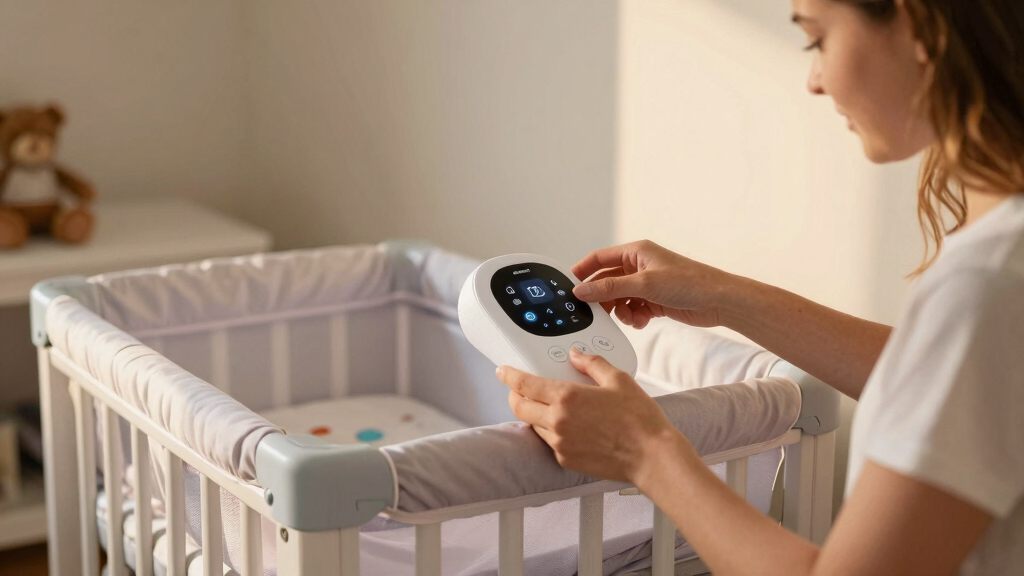
Remember, you can usually customize these features via the app. Spend a few minutes testing what your baby responds to best.
Tip: Keep a small chart of what works each night. Over time, you’ll notice your baby’s preferences and can set the bassinet accordingly.
adjustable baby bassinet soothing sounds
As an affiliate, we earn on qualifying purchases.
As an affiliate, we earn on qualifying purchases.
Tackle Connectivity and Power for Consistent Soothing
Smart bassinets rely heavily on good Wi-Fi or Bluetooth connections. If the device disconnects or the app doesn’t sync properly, features may not activate when needed. Ensuring a stable connection is vital because intermittent connectivity can lead to inconsistent soothing experiences, which may confuse or unsettle your baby. When your device frequently disconnects, it can create a cycle of frustration — you might think the device isn’t working, or worry about its reliability, which can add stress to already sleep-deprived parents.
Moreover, a reliable power supply isn’t just about keeping the device on; it’s about maintaining consistent performance. Low batteries or unstable outlets can cause the bassinet to stop rocking or playing sounds unexpectedly, disrupting your baby’s sleep routine and leading to unnecessary fussiness. For instance, plugging the device into a different outlet with a steady current restored full functionality, highlighting how critical a stable power source is for continuous operation.
Understanding these tradeoffs: even the most advanced features are useless if connectivity drops or power issues occur. The result is inconsistent soothing, which can make your baby more distressed and prolong the time it takes for them to settle. Therefore, investing in a good Wi-Fi signal, updating firmware regularly, and ensuring a stable power source are essential steps to maximize the device’s effectiveness and reliability.
Pro tip: Keep your device’s firmware updated through the app. Manufacturers often release updates that fix bugs, improve stability, and enhance responsiveness. Regular updates help you avoid glitches that might otherwise interfere with your soothing routines, ensuring a smoother experience for your baby and peace of mind for you.
baby bassinet vibration and rocking features
As an affiliate, we earn on qualifying purchases.
As an affiliate, we earn on qualifying purchases.
Modify Motion and Sound Settings for Better Results
If your smart bassinet isn’t settling your baby, it might be a matter of tuning the settings. For example, a baby who’s overstimulated by rapid rocking may need a slower, more gentle motion. Conversely, a baby who stays fussier might prefer a faster swing or louder white noise. Recognizing which settings suit your baby’s temperament can significantly improve their ability to relax and fall asleep.
Try this step-by-step:
- Reduce or increase the rocking speed incrementally to find the most calming pace.
- Switch sounds—try switching from white noise to nature sounds or lullabies to see which resonates better.
- Adjust volume levels—sometimes a softer sound is less intrusive, or louder helps drown out other noises, depending on your baby’s sensitivity.
- Test vibrations—if available, turn them on or off to see which soothes best. Remember, overdoing vibrations can overstimulate, so observe your baby’s cues carefully.
Understanding how these settings influence your baby’s comfort is crucial. Small adjustments can mean the difference between a restless night and a peaceful sleep. Recognizing your baby’s cues and preferences allows you to create an environment that adapts to their needs, fostering better sleep routines and reducing stress for everyone involved.
Patience is key. Your baby’s response might shift from night to night, and small tweaks can have a big impact. By understanding how different settings influence your baby’s comfort, you can create a personalized environment that promotes consistent sleep routines.
baby sleep troubleshooting devices
As an affiliate, we earn on qualifying purchases.
As an affiliate, we earn on qualifying purchases.
Troubleshoot Common Connectivity and Power Glitches
Connectivity issues are a common reason a smart bassinet isn’t working when you need it. If the soothing features aren’t activating, restart your app and device, as this simple step often resets the connection and restores functionality. But more importantly, understanding that stable connectivity is the backbone of your device’s performance highlights why it’s worth investing time in troubleshooting. An unstable Wi-Fi signal or interference can cause delays or failures in activating features, which might leave your baby fussing or cause you to lose confidence in the device.
Check that your Wi-Fi is stable—no sudden drops or overloads. For Bluetooth models, ensure your phone is close enough without interference. Firmware updates are also vital—install any available updates through the app. These updates often include bug fixes and performance improvements that enhance reliability, ensuring the device responds promptly during those critical moments when your baby needs soothing.
Power issues can cause the device to stop functioning unexpectedly. Confirm it’s plugged in correctly, or replace batteries if needed. A steady power supply keeps all features running smoothly and avoids interruptions that can disrupt your baby’s sleep routine.
Pro tip: Keep a backup plan—like a familiar blanket or your voice—ready in case tech glitches happen during those critical settling moments. This layered approach ensures your baby remains comforted even if technology hiccups occur.
Frequently Asked Questions
Why isn’t my smart bassinet soothing my baby?
It could be a matter of positioning, preferences, or connectivity. Try adjusting the sound, motion, and placement first. Sometimes, a small change makes all the difference in calming your little one.
How do I fix connectivity issues with my smart bassinet?
Restart the app and device, ensure your Wi-Fi or Bluetooth is stable, and keep firmware updated. Moving the device closer to your router or phone can also improve responsiveness.
Are smart bassinets safe for overnight sleep?
Yes, when used according to the manufacturer’s instructions and with safety guidelines in mind, they are generally safe. Always supervise your baby and follow all safety features listed.
What if my baby still won’t settle after adjustments?
Consider combining the bassinet with other soothing routines like swaddling, gentle shushing, or rocking. Sometimes, a multi-layered approach works best for stubborn fussiness.
What features should I prioritize in a smart bassinet?
Look for adjustable sound and motion settings, reliable connectivity, safety certifications, and user-friendly controls. These features give you the best chance to customize soothing for your baby.
Conclusion
Smart bassinets can be a game-changer, but they aren’t a magic fix. A little patience and some simple adjustments can turn them into your baby’s best sleep buddy. Remember, every little tweak gets you closer to those peaceful, restful nights you crave.
Once you find what works, it’s like flipping a switch—your little one drifts off with a gentle hum and a soft sway. That’s the power of personalization, even in high-tech baby gear. Keep experimenting, stay calm, and enjoy those precious sleep moments.
Cold & flu season Picks
humidifiers
As an affiliate, we earn on qualifying purchases.