
TL;DR

Turn the school run and nap time into listening time
- Thousands of audiobooks, podcasts and originals
- Listen on your phone, tablet or Echo — also offline
- Cancel anytime
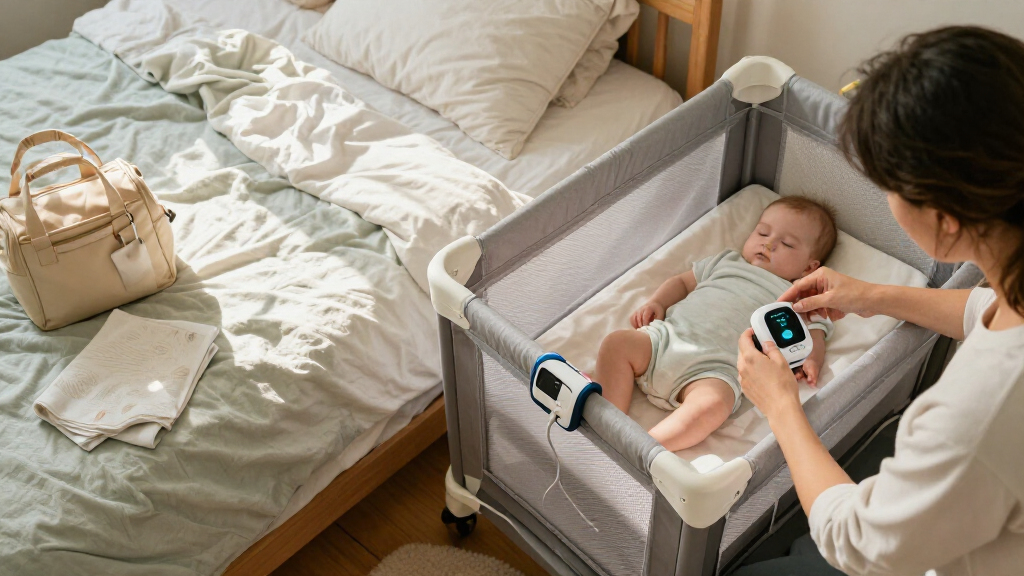
Movement monitors can behave differently in a travel crib because its mattress pad and flexible or suspended base may differ from the sleep surface the monitor was tested with. Check the monitor and crib instructions, use only an approved setup, and test as directed; a consumer monitor does not prevent SIDS or replace safe-sleep practices.
At 3 a.m. in a hotel room, a blinking monitor light can feel louder than the air conditioner. You may have packed the same sensor you use at home, but the travel crib’s sleep surface could be quite different from the one where you usually set it up.
A movement monitor is designed to detect certain movements while a baby sleeps and alert you if movement falls below the device’s threshold. What changes on the road depends on the monitor, the crib’s mattress and support surface, and the instructions for both products. A thin pad over a flexible base, a new room layout, or a weak Wi-Fi connection can all affect the practical setup.
This guide explains how wearable, under-mattress, and camera-based monitors differ in a travel crib, how to check a setup without altering the crib, and what alerts can and can’t tell you. The steady rule is simple: safe sleep comes first. A monitor may offer information or alerts, but it does not make an unsuitable sleep space safe or guarantee protection from sleep-related harm.
A travel crib’s pad and support base can change how an under-mattress sensor receives movement.
Check the exact monitor and crib instructions before using them together; do not improvise with extra padding or altered crib parts.
Test the travel setup as the monitor maker directs, while remembering that a function check does not establish medical protection.
Plan for charging, room layout, and Wi-Fi or Bluetooth interruptions, and keep cords and devices out of the baby’s sleep space.
Consumer movement monitors do not prevent SIDS or replace safe-sleep practices or clinician guidance.
Travel sleep · A practical field guide
Movement Monitors in a Travel Crib: What Changes
The sensor you use at home meets a different sleep surface, room layout and connection on the road. Here’s how to check the setup while keeping safe sleep at the center.
At a glance
Keep the sleep space in charge
A travel crib may use a thin mattress pad with a flexible or suspended support base. That differs from the firm mattress a monitor may have been tested with. Use only a combination approved by both manufacturers.
A monitor may offer information or alerts. It does not make an unsuitable sleep space safe or guarantee protection from sleep-related harm.
01 / Understand the differences
Three monitor types, three setup needs
“Baby monitor” does not mean universal crib compatibility. The sensor design determines what to check before packing and where travel can complicate setup.
Surface dependent
Under-mattress sensor
Movement reaches the sensor through the mattress and its support. Confirm the exact pad, base design and placement are approved.
Fit + power
Wearable sensor
Check the age range, fit, charging needs and accessory instructions. It still must be used exactly as directed.
View + connection
Camera-based monitor
Check the view, power, connection and cord placement. Keep cords and devices out of the baby’s sleep space.
Travel setup comparison
What to check before you leave
| Monitor type | Travel check | Possible snag |
|---|---|---|
| Under-mattress | CompatibilityApproved mattress, base and sensor position | A flexible support differs from the tested setup |
| Wearable | Fit & chargingAge range, fit, battery and accessories | The sensor needs charging after a long drive |
| Camera-based | Room logisticsView, power, connection and cord placement | The crib sits outside reliable Wi-Fi range |
02 / Before bedtime
Run the five-step travel check
A function check can reveal practical problems with placement, power or connection. It cannot certify the sleep surface, predict every alert or establish medical protection.
Read both manuals
Check restrictions for portable cribs, mattress pads, bases and sensor placement.
Assemble as directed
Use the crib’s approved mattress and parts. Don’t alter structural components.
Place only as approved
If the manual does not allow that sensor and surface combination, don’t use it there.
Run the function check
Use the travel configuration you plan to use and follow the maker’s procedure.
Check room logistics
Confirm charge and connection; keep cords and accessories out of the sleep space.
03 / Set expectations
What an alert can—and can’t—tell you
A monitor detects certain movement and alerts when movement falls below its device threshold. Its behavior depends on the model and approved setup.
Can provide
Information or an alertSome devices report movement-related information, sound or video under their stated conditions.
May be affected by
Setup and surroundingsSurface compatibility, positioning, nearby movement, battery, Wi-Fi or Bluetooth can matter.
Cannot establish
Medical protectionA function check does not prove that a device prevents injury, death or SIDS.
Trace the setup
From sleep surface to signal
Each link depends on the specific crib, monitor and room. If the configuration is unclear, ask the manufacturer instead of improvising at bedtime.
The non-negotiable foundation
Safe sleep comes first
Use a firm, flat, level sleep surface approved for the crib. Place the baby on their back in an uncluttered sleep space, and follow current guidance from your pediatrician and relevant public-health authorities.
Keep
The crib assembled as directed, with its approved mattress and parts; follow the instructions for both products.
Avoid
Extra padding, boards, blankets, altered crib parts or unapproved sensor placement to make a monitor fit.
Why a travel crib’s sleep surface can change the signal
Movement monitors in a travel crib can respond differently because the mattress pad and support base may transmit movement differently from a home crib’s firm mattress. An under-mattress sensor reads movement through the sleep surface and whatever supports it, so a thin pad over a flexible or suspended base may affect what reaches the sensor. Check the monitor’s approved surfaces before setting it up.
Think of the sensor as listening through a wall: a solid wall and a springy floor carry vibrations differently. That does not tell you that one setup is unsafe or that a monitor will fail; it means the device’s results depend on its design and approved configuration. For example, if you normally place a sensor under a specific mattress at home, sliding it under a travel crib pad simply because it fits is not a compatibility check.
Some travel cribs use a mattress pad that is part of the approved sleep setup, with a base designed to flex or hang. Adding a sensor, extra board, blanket, or other material beneath or around that arrangement could conflict with the crib or monitor instructions. Keep the crib assembled as its manufacturer directs, and use only the approved mattress and setup.
Before the trip, read the crib instructions and monitor instructions together. Look for the exact mattress type, base design, and portable crib restrictions. If the documentation does not clearly approve your configuration, contact the manufacturer rather than improvising at bedtime. Safe sleep guidance from your pediatrician and relevant public-health authorities remains the guide for the baby’s sleep space.
Popular right now

Dyson Cyclone V10 Origin Cordless Vacuum

Ninja Foodi DualZone 10-Qt Air Fryer, 6-in-1, Black (DZ302)

Vitamix Propel Series 750 Professional-Grade Blender, 4 Programs, Black
As an affiliate, we earn on qualifying purchases.
Know what each monitor type needs before you pack
Movement monitors in a travel crib need different things depending on how they sense movement: an under-mattress unit depends on the mattress and base, a wearable sensor depends on correct fit and power, and a camera-based unit depends on its view and connection. The label “baby monitor” does not tell you whether a product is compatible with a particular portable crib.
Imagine packing on Friday evening. An under-mattress sensor may require an approved, stable position beneath a specific sleep surface. A wearable device may not rely on the mattress, but it still needs to fit the baby as directed, have enough charge, and be used only for the age range and conditions in its instructions. A camera can show video or movement-related information depending on the model, but it needs a clear view and may rely on power or a wireless link.
These differences matter when your room is small. At a relative’s home, a camera might need to sit where it can see the crib without any cord or device entering the sleep space. In a hotel, the nearest outlet may be across the room, while a wearable may need recharging before the next sleep. Those are setup and packing problems, not reasons to change the crib or add accessories the crib maker does not approve.
| Monitor type | What to check for travel | Example snag |
|---|---|---|
| Under-mattress sensor | Approved mattress, base, and sensor position | A flexible support differs from the tested setup |
| Wearable sensor | Age range, fit, charging, and accessory instructions | The sensor needs charging after a long drive |
| Camera-based monitor | View, power, connection, and cord placement | The crib sits outside the reliable Wi-Fi area |
Check the exact model’s instructions rather than assuming that a feature or monitor type guarantees compatibility. If a monitor was prescribed for a medical reason, follow your clinician’s guidance; that situation is different from choosing a consumer monitor for general reassurance.
Check compatibility with this five-step travel setup
To check a movement monitor in a travel crib, confirm that both manufacturers approve the setup, assemble the crib as directed, place the monitor only where its instructions allow, run the prescribed function check, and confirm that power and connectivity suit the room. This five-step check can catch practical problems before bedtime; it cannot prove that a monitor prevents injury or death.
- Read both manuals. Find restrictions for portable cribs, mattress pads, bases, and sensor placement. Note any age limits for a wearable.
- Assemble the crib exactly as directed. Use its approved mattress and parts. Do not add padding or reposition structural components to accommodate the monitor.
- Place the monitor only as approved. If the manual does not allow a sensor under that mattress or base, do not place it there.
- Run the maker’s function check. Use the travel-crib configuration you will actually use, and follow the manufacturer’s steps.
- Check the room logistics. Confirm the app or receiver connects, the battery is charged, and cords or accessories stay out of the baby’s sleep space.
For instance, you might set up the crib in the guest room the day before a visit, only to find that the app loses its connection near the back wall. That gives you time to follow the monitor’s troubleshooting directions or choose another approved location for the receiver. It does not justify moving the sensor to an unapproved spot or putting a phone in the crib.
A function check tells you whether the device appears to operate according to the maker’s procedure in that configuration. It does not certify the sleep surface, predict every alert, or establish medical protection. Keep your expectations modest and your setup faithful to the instructions.
Plan for alarms, charging, and patchy connections
Travel can make monitor alerts less reliable or more annoying because rooms, connections, power access, and packing routines change. A sensor that is out of position, a low battery, background movement, or a weak wireless link can contribute to interruptions or false alarms, depending on the device. Follow its troubleshooting instructions instead of modifying the crib.
At home, your phone may stay on the same nightstand each night. On a trip, the crib might be near a rattling heater, the router may be two walls away, or a wearable may need charging after a day in a bag. A camera app might show a frozen connection just as you settle in. That “sharp silence” from a missing alert can tempt you to keep tapping the screen, so decide ahead of time where the receiver or phone can sit and how you will check its status.
Make a small packing checklist: charger, charged receiver or phone, any approved wearable accessories, and the manufacturer’s troubleshooting steps. Keep charging cords, cameras, and other devices away from the baby’s sleep space, following the product and crib instructions. If the app depends on Wi-Fi, verify the connection where you plan to place the receiver; if the product offers a local mode, consult its manual for how that mode works.
If an alarm sounds, follow the monitor maker’s response instructions and your pediatrician’s guidance for your child. Do not silence recurring alarms by changing the sleep surface or adding materials the crib maker has not approved. And if a clinician prescribed a monitor, ask that clinician how to manage travel setup and alerts for your situation.
Keep safe sleep at the center of the setup
A movement monitor does not make a sleep space safe and is not a substitute for safe-sleep practices. Use a firm, flat, level surface approved for the crib, place the baby on their back, and keep the sleep space uncluttered, following current guidance from your pediatrician and relevant public-health authorities. Consumer monitors are not a guarantee against SIDS or other sleep-related deaths.
The American Academy of Pediatrics has cautioned that consumer cardiorespiratory monitors should not be used as a strategy to reduce SIDS risk. That matters when a bright app dashboard feels like a safety net: the monitor may offer alerts or reassurance, but its presence does not remove the need for a correctly assembled crib and safe sleep habits. For example, at a grandparent’s house, an alert feature cannot turn an unapproved mattress topper into a suitable sleep surface.
A monitor may add information; it does not replace the sleep setup or medical guidance your baby needs.
Product designs, instructions, and regulatory status vary, so check current information from the specific manufacturer and relevant health authorities. For child products, check age-appropriateness and search for applicable CPSC recalls before use. If your child has a medical condition or a clinician prescribed monitoring, ask the clinician how that advice applies during travel instead of treating general consumer-monitor guidance as a medical plan.
When you arrive, keep the priorities in order: assemble the crib correctly, use its approved sleep surface, place the baby on their back in a clear space, then use a compatible monitor according to its instructions if you choose. The monitor belongs in the routine only when the setup works within those boundaries.
Decide what to do when the monitor won’t fit the travel setup
If the monitor maker does not approve the travel crib’s mattress and base, do not force the combination; use the crib according to its instructions and keep the sleep space safe. Compatibility is model-specific, so the same monitor might be approved with one portable crib configuration and not another. A quick manual check can save you from a midnight guessing game.
For example, suppose your under-mattress unit is approved only for a firm, rigid support surface, while the travel crib uses a flexible base. If the manuals do not authorize that arrangement, leave the sensor out rather than wedging it beneath the pad. You can still follow safe-sleep practices and ask the manufacturer whether an approved setup exists for that exact model.
Wearables and cameras have their own boundaries. A wearable still needs the right fit, age range, and charge, while a camera needs power and a stable view. Neither turns a travel crib into a different product or guarantees that you will receive every alert. If the equipment creates more uncertainty than useful information, it is reasonable to focus on the approved crib setup and discuss any medical monitoring questions with your child’s clinician.
- Check the monitor’s allowed surfaces and the crib’s assembly directions.
- Do not add, remove, or reposition crib parts to accommodate a sensor.
- Check the device’s age limits, charging needs, and current recall information.
- Ask the manufacturer or clinician when the instructions leave an important question unanswered.
When choosing a travel crib, prioritize applicable safety requirements, correct assembly, and the approved firm, flat sleep surface. Monitor compatibility comes after those basics, not before them.
Frequently Asked Questions
Will my movement monitor work in a travel crib?
It depends on the monitor model and the crib’s mattress and support surface. Check both manufacturers’ instructions, especially for an under-mattress sensor, and use only an approved configuration.
Can I put the sensor under the travel-crib mattress pad?
Only if the monitor manufacturer explicitly allows that placement for the specific mattress and base, and the crib instructions allow the setup. Do not add materials or alter the crib to make a sensor fit.
Will a travel crib cause more false alarms?
An incompatible setup, poor placement, a weak connection, or movement around the device can contribute to interruptions or false alarms, depending on the monitor. Follow the manufacturer’s troubleshooting steps rather than changing the sleep surface.
Can I use a wearable monitor while traveling?
Travel mainly adds practical checks: confirm the device is intended for your baby’s age, fits and is used as directed, and has enough charge. Keep any accessories out of the sleep space and follow the device instructions.
Does a movement monitor prevent SIDS?
No consumer movement monitor guarantees prevention of SIDS or makes safe-sleep practices unnecessary. Follow current safe-sleep guidance and your pediatrician’s advice; if a clinician prescribed monitoring, ask them how to use it during travel.
Conclusion
Before you pack a monitor, check whether its instructions approve the exact travel crib surface you plan to use. Set up the crib as its maker directs, test the monitor by its instructions, and keep safe sleep habits at the center of the night.
A monitor can travel in your bag; its limits travel with it. When the room is dark and the air conditioner hums, let a sound setup and clear sleep space do the reassuring work.