
TL;DR

Turn the school run and nap time into listening time
- Thousands of audiobooks, podcasts and originals
- Listen on your phone, tablet or Echo — also offline
- Cancel anytime
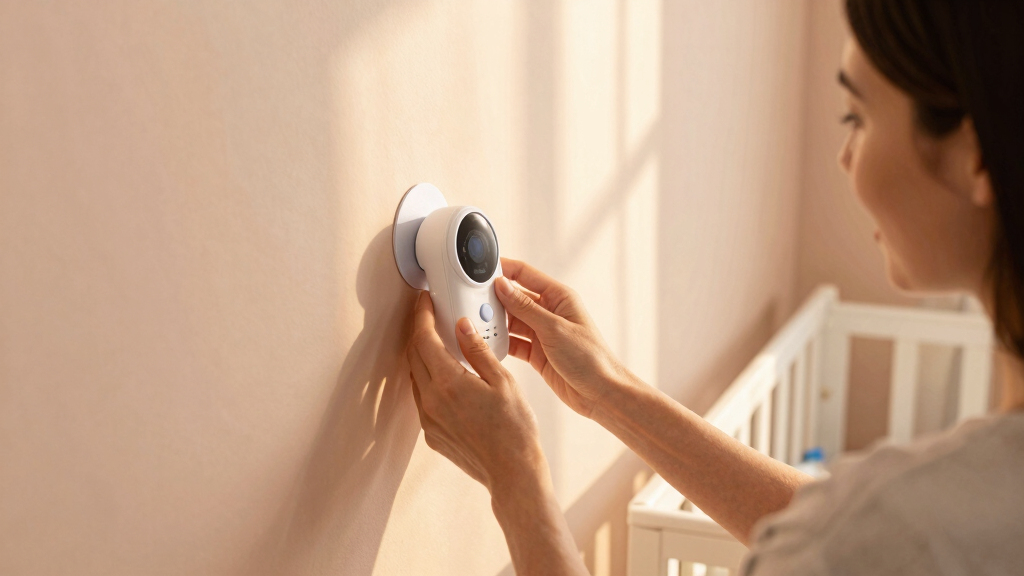
Non-drilling baby monitor mounts are a safe, damage-free way to keep an eye on your little one. Using adhesive strips, suction cups, or clips, you can set up a sturdy, flexible monitor placement without damaging walls or furniture.
Ever tried to mount a baby monitor, only to realize drilling holes feels overkill or risky? You’re not alone. Many parents want a secure setup without the hassle or damage of tools. The good news: there are plenty of clever, damage-free options that hold your monitor steady while keeping your nursery looking tidy.
Whether you’re renting or just want a quick fix, understanding these non-drilling ideas makes it easier to keep an eye on your little one without turning your walls into Swiss cheese. Let’s explore the best ways to mount your monitor safely, easily, and stylishly.
Choose high-quality, rated mounts suited for your monitor’s weight and your wall or furniture surfaces.
Adhesive strips like Command are reliable, damage-free, and easy to reposition or remove.
Regularly check mounts to ensure they stay secure, especially in humid or high-traffic areas.
Avoid textured or porous walls for suction or adhesive mounts; smooth surfaces work best.
Reposition or remove mounts carefully to prevent damage or accidents—no tools needed.
Why Non-Drilling Mounts Are Your Best Bet for Baby Monitors
Non-drilling mounts offer a perfect blend of safety, convenience, and home-friendly design. They won’t damage walls or furniture, and you can reposition them effortlessly as your nursery layout changes. For example, adhesive strips like Command hooks can hold a monitor for months, then come off cleanly without residue.
Plus, these options are safer — no risk of falling or detaching unexpectedly. They’re especially handy if you’re renting or want to avoid tools and debris. Simply put, these mounts give you peace of mind and flexibility.
As an affiliate, we earn on qualifying purchases.
Top 5 Damage-Free Mounting Ideas for Your Baby Monitor
Here’s a quick rundown of the most popular damage-free options:
- Adhesive Mounts and Strips: Heavy-duty 3M Command strips or similar products stick securely and come off without damage. They distribute weight evenly, which minimizes stress on walls or furniture, reducing the risk of damage or falls. Choosing the right size and weight capacity ensures your monitor stays secure without risking accidental falls.
- Suction Cup Mounts: Attach to smooth surfaces like glass or tiles; adjustable arms help position the camera. However, their effectiveness depends on surface cleanliness and smoothness. When used on appropriate surfaces, they can be repositioned easily, but on textured or porous walls, their grip weakens, increasing the risk of falls. Understanding these tradeoffs helps you choose the best option for your nursery environment.
- Clips and Clamp Mounts: Clip onto crib rails, shelves, or furniture edges; padded grips protect your nursery. These are versatile but require careful placement to avoid obstructing your baby’s movement or safety. Properly secured, they offer a quick, damage-free way to position monitors, but improper use can lead to instability or accidental dislodging.
- Flexible Gooseneck Holders: Standalone holders with bendable arms, placed on dressers or tables. Their flexibility allows precise positioning, and they can be moved easily if needed. However, they need a sturdy surface to prevent tipping, and their stability depends on the weight distribution. They are excellent for adjustable setups but require careful placement to avoid tipping over.
- Velcro Strips and Tape: Heavy-duty velcro for quick attachment, perfect for lightweight monitors. These provide a quick, damage-free solution with the added benefit of easy repositioning. The tradeoff is that velcro generally supports lighter monitors better and may not be suitable for heavier or more complex devices, which could slip or detach over time.
For example, a parent used Command strips to mount a sleek baby monitor on the wall near the crib. When her baby grew, she simply repositioned the monitor on a different wall, no tools required. Choosing the right option depends on your monitor’s weight, nursery surfaces, and your need for flexibility, but these methods all prioritize safety and damage-free installation.
As an affiliate, we earn on qualifying purchases.
Choosing the Right Non-Drilling Mount for Your Nursery
Picking the best mount depends on your monitor’s size and weight. For example, a lightweight audio monitor needs only velcro or small adhesive strips. Heavier or larger cameras might require stronger options like suction cups or multiple command strips.
Think about your nursery’s surfaces. Smooth, clean surfaces like glass, finished wood, or metal are ideal for suction and adhesive mounts. Avoid textured or porous walls that won’t hold well. If you choose a surface that isn’t perfectly smooth, consider additional support or alternative mounting methods to prevent accidents.
Regularly check your mounts to ensure they stay secure, especially in humid areas like near windows or humidifiers. Replacing adhesive strips every few months can prevent unexpected falls. Also, consider the environment—humid or greasy surfaces can weaken adhesives or suction cups, so inspection and maintenance are key to safety.
Remember, selecting the right mount is about balancing weight capacity, surface compatibility, and ease of repositioning, ensuring your setup remains secure and safe for your baby’s environment.
As an affiliate, we earn on qualifying purchases.
How to Reposition or Remove Your Non-Drilling Baby Monitor Mounts
- Check the product instructions for weight limits and removal tips. Understanding these details helps prevent damage or accidents when repositioning.
- Gently peel off adhesive strips or move suction cups to new locations. Applying slow, even pressure minimizes surface damage or residue.
- If using velcro, detach and reattach at your preferred spot. Ensure the surface is clean and dry for optimal adhesion during reapplication.
- Reposition clamps or clips carefully to avoid damaging furniture or surfaces. Proper handling ensures longevity and safety of the mount.
- Always verify stability after moving the monitor. A quick check ensures the setup remains secure and reduces the risk of falls or damage.
For example, a parent repositioned her monitor from the wall to a dresser when her baby started crawling. She used the same adhesive strips, removed them gently, and reattached on a new surface—no damage or tools needed. Taking care during removal and reattachment preserves the integrity of surfaces and ensures ongoing safety for your child.
As an affiliate, we earn on qualifying purchases.
Safety Tips and Common Pitfalls to Avoid
Always choose mounts rated for your monitor’s weight. Overloading adhesive or suction mounts can cause falls, risking your baby’s safety. For instance, a heavy security camera fell because it exceeded the adhesive’s capacity, leading to a quick cleanup and rethinking the mount. Recognizing weight limits is crucial because exceeding them can cause sudden falls, posing safety hazards.
Make sure surfaces are clean and dry before applying mounts — dirt or moisture weaken adhesion. This step is vital because even the best mounts won’t hold securely on dirty or wet surfaces, increasing the risk of falls. Regularly check mounts to ensure they stay secure, especially in humid environments, to prevent accidents caused by weakened adhesion over time.
Avoid placing mounts on textured or porous walls, as they won’t hold well. Instead, use flat, smooth surfaces for best results. Remember, safety first—if in doubt, opt for a more secure mounting method or consult a professional. Proper maintenance and cautious selection are key to a safe nursery setup.
Frequently Asked Questions
Are non-drilling mounts safe for my baby monitor?
Yes, if you choose quality mounts rated for your monitor’s weight and follow the installation instructions. They’re designed to hold securely without damaging surfaces or risking falls.Will adhesive or suction mounts damage my walls or furniture?
Reputable adhesive strips like Command are made to come off cleanly without residue or damage. Suction cups generally leave no marks but work best on smooth, non-porous surfaces.Can I reposition my baby monitor easily?
Most non-drilling options are designed for easy repositioning. Just check the product’s reusability and weight limits, then gently remove and reattach at your new spot.What if my monitor is heavy or bulky?
Use mounts rated for higher weights or combine multiple mounts for extra stability. Always verify the maximum weight capacity before installation.Are there DIY or homemade solutions?
Yes, some parents use household items like sturdy rubber bands or clips, but ensure they’re secure and won’t damage your monitor or surfaces. Prioritize safety above all.Conclusion
Your nursery setup doesn’t have to be a wall of holes. With the right damage-free mounts, you can keep an eye on your baby safely and flexibly. Think less drill, more clever placement.
Next time you set up or adjust your monitor, remember: simple, safe, and damage-free options are just a mount away—keeping your nursery cozy and damage-free.
Evergreen bestsellers Picks
bestsellers
As an affiliate, we earn on qualifying purchases.