
TL;DR

Turn the school run and nap time into listening time
- Thousands of audiobooks, podcasts and originals
- Listen on your phone, tablet or Echo — also offline
- Cancel anytime
Two room thermometers can show different temperatures even when both are working perfectly. The discrepancy usually stems from microclimates like sunlight or drafts, differing response times, or inherent calibration offsets rather than device failure. For nursery safety, place devices in a neutral, shaded spot and allow 20-30 minutes for stabilization before comparing.
You glance at the nursery thermometer. It reads 72°F. You walk into the living room, check the smart hub display, and it says 69°F. A chill runs down your spine. Is the heater broken? Is the baby cold? Or is one of your devices lying to you?
Before you panic or start buying new gadgets, take a breath. Room thermometer accuracy is rarely black and white. Two devices can show different temperatures even when both are working exactly as designed. The difference often comes from where and how they measure, not simply from one device being “wrong.”
This guide cuts through the tech jargon. We’ll explain why your devices disagree, how to check if they’re actually broken, and what level of precision really matters for your child’s comfort. Let’s get to the bottom of those mismatched numbers.
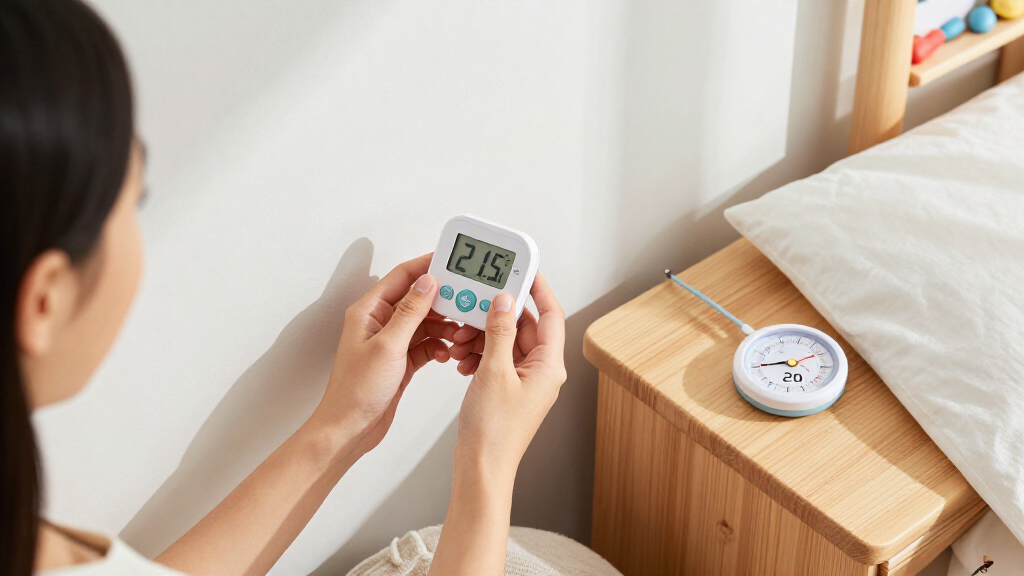
Two thermometers can differ by 2-4 degrees and still be within their stated accuracy specs (±1-2°F each).
Placement matters most: Move devices to a neutral, shaded spot away from vents and windows for a fair comparison.
Allow 20-30 minutes for devices to stabilize before comparing readings to account for response time differences.
Precision (decimals on the display) is not the same as accuracy (closeness to true temperature); ignore extra digits.
If a consistent offset exists, check if your device allows calibration; if not, trust the device that matches your comfort best.
Microclimates: Why Location Matters More Than Tech
Two room thermometers can show different temperatures even when both are working, primarily because they are measuring different microclimates. A room is not a single, uniform box of air. It’s a dynamic environment with hot spots and cold zones. If you place one thermometer near a sunny window and another in a shaded corner, you aren’t measuring “the room.” You’re measuring two distinct pockets of air.
Consider a typical nursery scenario. One device sits on a dresser near an exterior wall. That wall might be cool to the touch, drawing heat away from the air immediately around the sensor. The other device sits on a shelf near a electronics like a baby monitor camera or a humidifier. These appliances generate waste heat, creating a warm bubble around the sensor. The difference isn’t a glitch; it’s physics.
Airflow plays a huge role here. A draft from a slightly open window or a return vent can lower the temperature reading significantly. Conversely, a sunny spot can raise it. Research into building physics shows that temperature gradients within a single room can vary by several degrees depending on proximity to heat sources and cold surfaces. If your devices are more than a few feet apart, they are likely measuring different air masses.
To get a true reading, you need to control the environment. Move both devices to the same spot. Let them sit there. If they still disagree after stabilizing, then you might have a hardware issue. But if they agree, your original setup was simply measuring different things.
Popular right now

De'Longhi 15-Bar Pump Espresso Machine with Milk Frother & Temperature Control

KitchenAid Artisan 5-Qt Tilt-Head Stand Mixer – Almond Cream (KSM150PS)

Apple AirPods Pro 3 Wireless Earbuds with Active Noise Cancellation
As an affiliate, we earn on qualifying purchases.
The Speed Trap: Response Time and Stabilization
Have you ever moved a thermometer from a cold hallway to a warm nursery and watched the numbers climb? That climb is response time. Different devices react to temperature changes at different speeds. If you compare readings before both devices have fully adjusted to their new environment, you’ll see a temporary discrepancy that has nothing to do with accuracy.
Mechanical thermometers, often found in older analog designs, use bimetal coils. These physical elements expand and contract slowly. They might take five to ten minutes to catch up to a sudden change. Digital thermometers with thermistors are faster, often stabilizing in one to two minutes. But even digital sensors need time to reach thermal equilibrium with the surrounding air.
Imagine you just turned on the heater. The air near the vent warms up quickly. A sensor right next to the vent will spike. A sensor across the room will lag. If you check both at the same moment, you’ll see a gap. This isn’t an error; it’s a snapshot of a changing system. To compare fairly, you must wait. Allow at least 20-30 minutes for the devices to settle in a stable environment.
If you’re testing accuracy, don’t just glance at the display. Watch it. If the numbers are still ticking up or down, the reading isn’t final. Patience is your best tool here. Rushing the comparison leads to false alarms and unnecessary worry about your equipment.
Accuracy vs. Precision: Don’t Be Fooled by Decimals
A digital thermometer showing 72.4°F looks more scientific than one showing 72°F. But that extra decimal point doesn’t mean it’s more accurate. It just means it’s more precise. Precision is about resolution—how finely the device displays data. Accuracy is about correctness—how close the reading is to the true temperature.
Most consumer indoor thermometers have a stated accuracy range of ±1–2°F (about ±0.5–1°C). This means a device displaying 72.4°F could actually be measuring anywhere from 71.4°F to 73.4°F. The extra digit is just marketing fluff if the underlying sensor isn’t calibrated to that level. Two devices can both be within their specified accuracy ranges but still disagree by up to 4°F if one reads high and the other reads low.
Check the manual. If a device doesn’t state its accuracy, assume it’s within that ±2°F range. For a nursery, this is usually fine. Babies are comfortable in a range of 68-72°F. A 2-degree error won’t hurt them. But if you’re monitoring a medical incubator or a sensitive fermentation project, you need a lab-grade instrument, not a smart home gadget.
Don’t confuse a pretty display with a reliable one. A simple analog dial might be more reliable than a flashy smart sensor if the smart sensor is poorly calibrated. Trust the specs, not the screen.
How to Compare Two Thermometers the Right Way
So, how do you know if your devices are actually broken? You need a controlled test. You can’t just put them on different shelves and expect them to agree. Here is the step-by-step process to compare them fairly.
- Find a neutral spot. Choose a location away from direct sunlight, windows, exterior walls, heating vents, and electronics. A bookshelf in the middle of the room is ideal.
- Place them side by side. Put both thermometers in the exact same spot, close enough to share the same air but not touching each other.
- Wait for stabilization. Let them sit for at least 20-30 minutes. This allows both sensors to reach thermal equilibrium with the room air.
- Check the readings. Note the temperature on both devices. If they are within 2-3°F of each other, they are likely both working correctly.
- Look for a consistent offset. If one device consistently reads 3 degrees higher than the other, it may have a calibration offset. This is normal for consumer devices.
If the gap changes wildly or one device jumps around erratically, you might have a faulty sensor or poor battery contact. But if they sit steadily a few degrees apart, they’re probably fine. You just need to know which one to trust for your daily checks.
When to Worry: Calibration and Faulty Sensors
While small differences are normal, some signs point to a real problem. If a thermometer reads 85°F in a cool room, or if the numbers fluctuate wildly without any change in the environment, the device is likely faulty. Electronics can drift over time, especially if they’ve been dropped or exposed to extreme temperatures.
Some digital thermometers allow for calibration offsets. Check your manual. If you can adjust the reading by a few degrees, you can sync your devices. If one reads 3 degrees high, you can set it to read 3 degrees lower. This doesn’t make it more accurate in a scientific sense, but it makes your system consistent.
Most cheap smart home sensors don’t offer this feature. If you can’t calibrate it, and it’s consistently off by more than 3-4 degrees, consider replacing it. For nursery monitoring, consistency is key. You want to know that a drop in temperature means the room got colder, not that the sensor is glitching.
Humidity can also interfere. Some sensors are sensitive to condensation. If you use a humidifier, keep the thermometer away from the direct mist. Water droplets on the sensor can cause erratic readings or even permanent damage. Keep it dry and in good air circulation.
Smart Home Sensors: Convenience vs. Reality
Smart home thermometers are everywhere now. They log data, send alerts, and integrate with your heating system. But just because a device is “smart” doesn’t mean it’s more accurate. In fact, many smart sensors are designed for comfort automation, not medical-grade precision.
These devices often update at intervals rather than continuously. If your app updates every 5 minutes, you might miss a sudden draft or a heater kick-on. Also, smart sensors are often placed in living areas for general home automation. They might not be optimized for the specific microclimate of a nursery.
Multiple sensors can be a feature, not a bug. Using two or three sensors around the house helps you understand temperature gradients. You can see that the nursery is warmer than the hallway, or that the upstairs is hotter than the downstairs. This data helps you manage your HVAC system better. Don’t treat one reading as the absolute truth for the whole house.
Remember, room thermometer accuracy in smart devices depends on placement and calibration just like any other tool. A smart sensor in a drafty corner will still give you a drafty reading. Use them for trends and automation, but keep a simple, reliable analog or digital thermometer nearby for quick, trustworthy checks.
Frequently Asked Questions
Why do my two thermometers differ by a few degrees?
They are likely measuring different microclimates due to placement near windows, vents, or electronics. They may also have different response times or inherent calibration offsets within their stated accuracy ranges.Which thermometer should I trust?
Trust the one placed in a neutral, representative location. Check the manual for stated accuracy. If both are within ±2°F of each other, either is fine for general comfort monitoring.How long should I wait before reading a thermometer?
Wait until the reading stabilizes. For a fair comparison, allow at least 20-30 minutes after moving the device or changing the room temperature.Can I calibrate a digital room thermometer?
Some smart home devices allow offset adjustments in the app. Many basic digital thermometers do not. Check your manual. If adjustment isn’t possible, note the offset or replace the device if it’s inaccurate.Does a thermostat show the same temperature as a room thermometer?
Not necessarily. Thermostats measure air at their specific location, which may be affected by wall drafts or sunlight. A separate thermometer elsewhere can show a different, often more representative, room temperature.Conclusion
Don’t let mismatched numbers keep you up at night. Most disagreements between room thermometers are due to physics, not failure. Sunlight, drafts, and response times create natural variations. By placing devices side-by-side in a neutral spot and waiting for them to stabilize, you can usually resolve the mystery.
For your nursery, aim for consistency. If your devices agree within a few degrees, you’re good. Trust your instincts and your baby’s comfort over a single decimal point. Keep your sensors clean, dry, and away from heat sources, and you’ll have reliable data when it matters most.